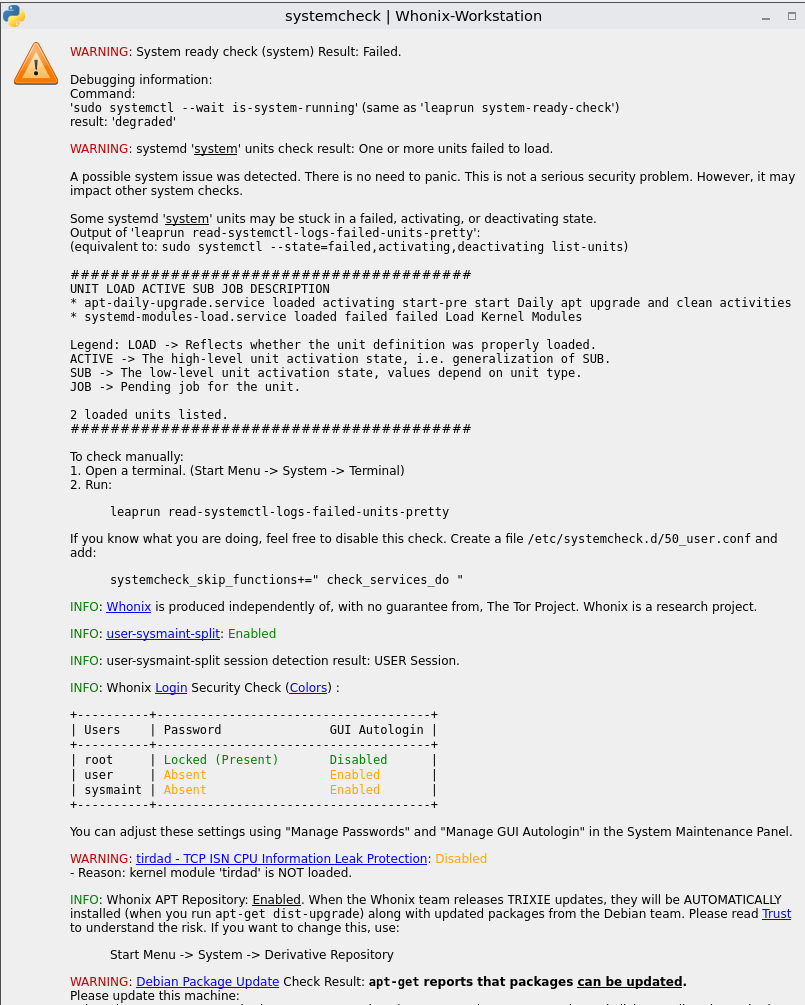
I updated whonix today. They wanted to update the kernel, and now I get an error.
Host- ZorinOS 18.1
Virtualbox version- 7.0.16-dfsg-2ubuntu1.3
Here are relevant error messages from systemcheck.
~$ systemcheck
[WARNING] [systemcheck] System ready check (system) Result: Failed.

Debugging information:
Command:
'sudo systemctl --wait is-system-running'
(same as 'leaprun system-ready-check')
result: 'degraded'
[WARNING] [systemcheck] systemd 'system' units check result: One or more units failed to load.

A possible system issue was detected. There is no need to panic. This is not a serious security problem. However, it may impact other system checks.

Some systemd 'system' units may be stuck in a failed, activating, or deactivating state.

Output of 'leaprun read-systemctl-logs-failed-units-pretty': (equivalent to: sudo systemctl --state=failed,activating,deactivating list-units)

########################################
  UNIT                         LOAD   ACTIVE SUB    DESCRIPTION
* systemd-modules-load.service loaded failed failed Load Kernel Modules

Legend: LOAD   -> Reflects whether the unit definition was properly loaded.
        ACTIVE -> The high-level unit activation state, i.e. generalization of SUB.
        SUB    -> The low-level unit activation state, values depend on unit type.

1 loaded units listed.
########################################

To check manually:
1. Open a terminal. (Start Menu -> System -> Terminal)
2. Run:
leaprun read-systemctl-logs-failed-units-pretty
[WARNING] [systemcheck] tirdad - TCP ISN CPU Information Leak Protection: Disabled

- Reason: kernel module 'tirdad' is NOT loaded.
Here are the relevant messages from journalctl -b
~$ sudo journalctl -b | grep Failed | grep systemd-modules-load
host systemd-modules-load[223]: Failed to insert module 'tirdad': Operation not permitted
host systemd[1]: systemd-modules-load.service: Failed with result 'exit-code'.
host systemd[1]: Failed to start systemd-modules-load.service - Load Kernel Modules.
host systemd-modules-load[486]: Failed to insert module 'tirdad': Operation not permitted
host systemd[1]: systemd-modules-load.service: Failed with result 'exit-code'.
host systemd[1]: Failed to start systemd-modules-load.service - Load Kernel Modules.
I got this exact problem after updating my gateway, only difference is that I use KVM and do not ever remember enabling or seeing secure boot enabled in system check. I am not willing to upgrade anything else until I can confirm the bug is fixed or can be reverted.
host systemd-modules-load[223]: Failed to insert module 'tirdad': Operation not permitted
~$ sudo mokutil --sb-state
EFI variables are not supported on this system
Should I enable secure boot in virtualbox guests? Is this something that I am supposed to do? I do not remember that being in the instructions for installing whonix.
commit 5da5662181ef8a251e3ba564903002c2e87de452
Author: Eric Dumazet <edumazet@google.com>
Date:   Tue Jun 16 14:36:29 2026 +0200

    tcp: secure_seq: add back ports to TS offset

    [ Upstream commit 165573e41f2f66ef98940cf65f838b2cb575d9d1 ]

    This reverts 28ee1b746f49 ("secure_seq: downgrade to per-host timestamp offsets")

    tcp_tw_recycle went away in 2017.

    Zhouyan Deng reported off-path TCP source port leakage via
    SYN cookie side-channel that can be fixed in multiple ways.

    One of them is to bring back TCP ports in TS offset randomization.

    As a bonus, we perform a single siphash() computation
    to provide both an ISN and a TS offset.

    Fixes: 28ee1b746f49 ("secure_seq: downgrade to per-host timestamp offsets")
    Reported-by: Zhouyan Deng <dengzhouyan_nwpu@163.com>
    Signed-off-by: Eric Dumazet <edumazet@google.com>
    Reviewed-by: Kuniyuki Iwashima <kuniyu@google.com>
    Acked-by: Florian Westphal <fw@strlen.de>
    Link: https://patch.msgid.link/20260302205527.1982836-1-edumazet@google.com
    Signed-off-by: Jakub Kicinski <kuba@kernel.org>
    (cherry picked from commit 165573e41f2f66ef98940cf65f838b2cb575d9d1)
    [kept the DCCP functions in the header, as DCCP was not retired yet
     in 6.12]
    Signed-off-by: Heiko Stuebner <heiko.stuebner@cherry.de>
    Signed-off-by: Greg Kroah-Hartman <gregkh@linuxfoundation.org>
This is very, very good info to have! That looks like Debian’s kernel has changed in a way incompatible with the existing Tirdad code, and we’ll have to update it.
I have written what is coming up on systemcheck after I did sudo apt update and sudo apt upgrade yesterday. Is anybody encountering these same issues? How can they be fixed? It’s happening on both of my virtual machines. I am using whonix on qemu/kvm on debian 12. I cannot remember exactly what was updated but I have no idea how to fix these issues that come up when I start my virtual machines.
WARNING: System ready check (system) Result: Failed.
Debugging information:
Command:
‘sudo systemctl --wait is-system-running’ (same as ‘leaprun system-ready-check’)
result: ‘degraded’
WARNING: systemd ‘system’ units check result: One or more units failed to load.
A possible system issue was detected. There is no need to panic. This is not a serious security problem. However, it may impact other system checks.
Some systemd ‘system’ units may be stuck in a failed, activating, or deactivating state.
Output of ‘leaprun read-systemctl-logs-failed-units-pretty’:
(equivalent to: sudo systemctl --state=failed,activating,deactivating list-units)
########################################
UNIT LOAD ACTIVE SUB DESCRIPTION
Legend: LOAD → Reflects whether the unit definition was properly loaded.
ACTIVE → The high-level unit activation state, i.e. generalization of SUB.
SUB → The low-level unit activation state, values depend on unit type.
1 loaded units listed.
########################################
To check manually:
Open a terminal. (Start Menu → System → Terminal)
Run:
leaprun read-systemctl-logs-failed-units-pretty
If you know what you are doing, feel free to disable this check. Create a file /etc/systemcheck.d/50_user.conf and add:
systemcheck_skip_functions+=" check_services_do "
INFO: Whonix is produced independently of, with no guarantee from, The Tor Project. Whonix is a research project.
INFO: user-sysmaint-split: Absent
INFO: user-sysmaint-split session detection result: USER Session.
INFO: Whonix Login Security Check (Colors) :
±------±-------------------------------------+
| Users | Password GUI Autologin |
±------±-------------------------------------+
| root | Locked (Present) Disabled |
| user | Absent Enabled |
±------±-------------------------------------+
You can adjust these settings using “Manage Passwords” and “Manage GUI Autologin” in the System Maintenance Panel.
WARNING: tirdad - TCP ISN CPU Information Leak Protection: Disabled
Reason: kernel module ‘tirdad’ is NOT loaded.
INFO: Whonix APT Repository: Enabled. When the Whonix team releases TRIXIE updates, they will be AUTOMATICALLY installed (when you run apt-get dist-upgrade) along with updated packages from the Debian team. Please read Trust to understand the risk. If you want to change this, use:
Start Menu → System → Derivative Repository
INFO: Debian Package Update Check Result: No updates found via apt-get.
Hey when I tried to run Systemcheck today In my Gateaway I got tirdad and Kloak disabled and a bunch of common other errors. I haven`t done anything or changed something what so ever
I have completely deleted the Whonix images and tried installing fresh new ones
But when I boot the Gateaway I get “Failed to start systemd modules load service”
WARNING: System ready check (system) Result: Failed.
Debugging information:
Command:
‘sudo systemctl --wait is-system-running’ (same as ‘leaprun system-ready-check’)
result: ‘degraded’
WARNING: systemd ‘system’ units check result: One or more units failed to load.
A possible system issue was detected. There is no need to panic. This is not a serious security problem. However, it may impact other system checks.
Some systemd ‘system’ units may be stuck in a failed, activating, or deactivating state.
Output of ‘leaprun read-systemctl-logs-failed-units-pretty’:
(equivalent to: sudo systemctl --state=failed,activating,deactivating list-units)
########################################
UNIT LOAD ACTIVE SUB DESCRIPTION
Legend: LOAD → Reflects whether the unit definition was properly loaded.
ACTIVE → The high-level unit activation state, i.e. generalization of SUB.
SUB → The low-level unit activation state, values depend on unit type.
1 loaded units listed.
########################################
To check manually:
Open a terminal. (Start Menu → System → Terminal)
Run:
leaprun read-systemctl-logs-failed-units-pretty
If you know what you are doing, feel free to disable this check. Create a file /etc/systemcheck.d/50_user.conf and add:
systemcheck_skip_functions+=" check_services_do "
WARNING: tirdad - TCP ISN CPU Information Leak Protection: Disabled
Does this still apply in the case where users have not enabled secure boot? I don’t think a simple update even with a new linux kernel should be prompting these errors messages, considering many users have done this multiple times with no such errors. The only user confirmed to have Secure Boot enabled with such errors is the post you included on the Kicksecure Forum.
However, this thread and this other one with my input does not admit to having secure boot enabled. I want to be sure we’re approaching this issue the right way and don’t brick our boot process. I can confirm system check does not return anything related to secure boot like the log image in the Kick Secure thread had.
I run Whonix in VirtualBox 7.2.6. I only updated Flatpak in the terminal and then ran the system check. Since then, error messages appear. I don’t know Whonix that well. What solutions are there? Are the mistakes uncritical or should I do something?