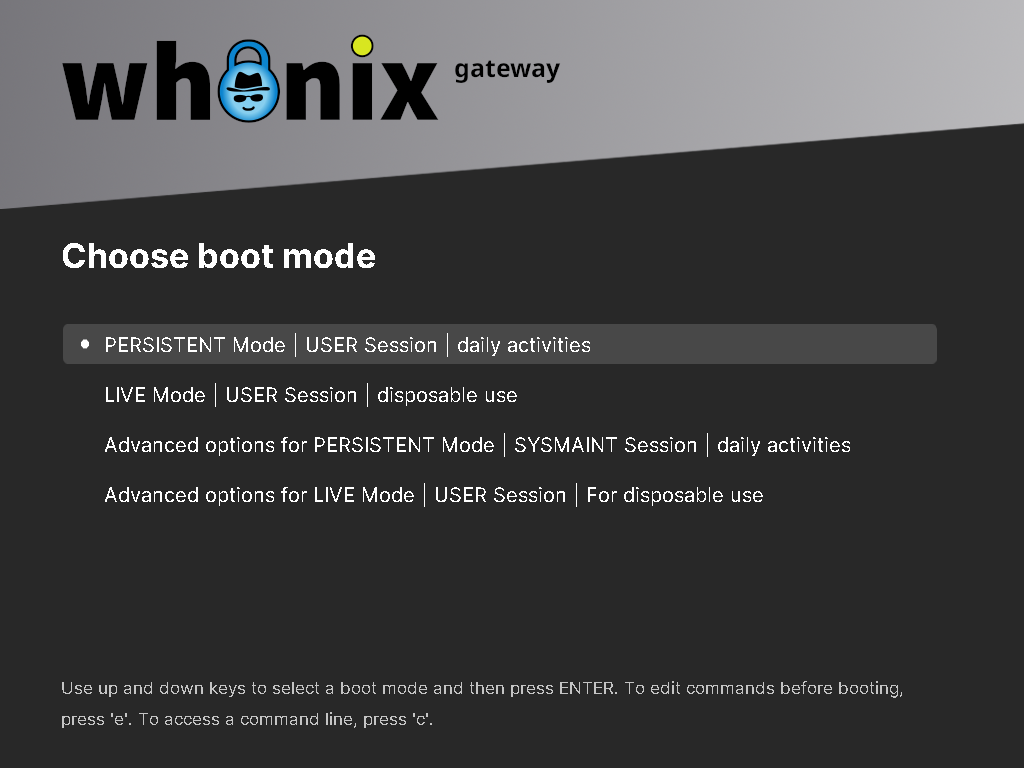
Why is it doing this?

Ok why is it giving me these 3 options now?
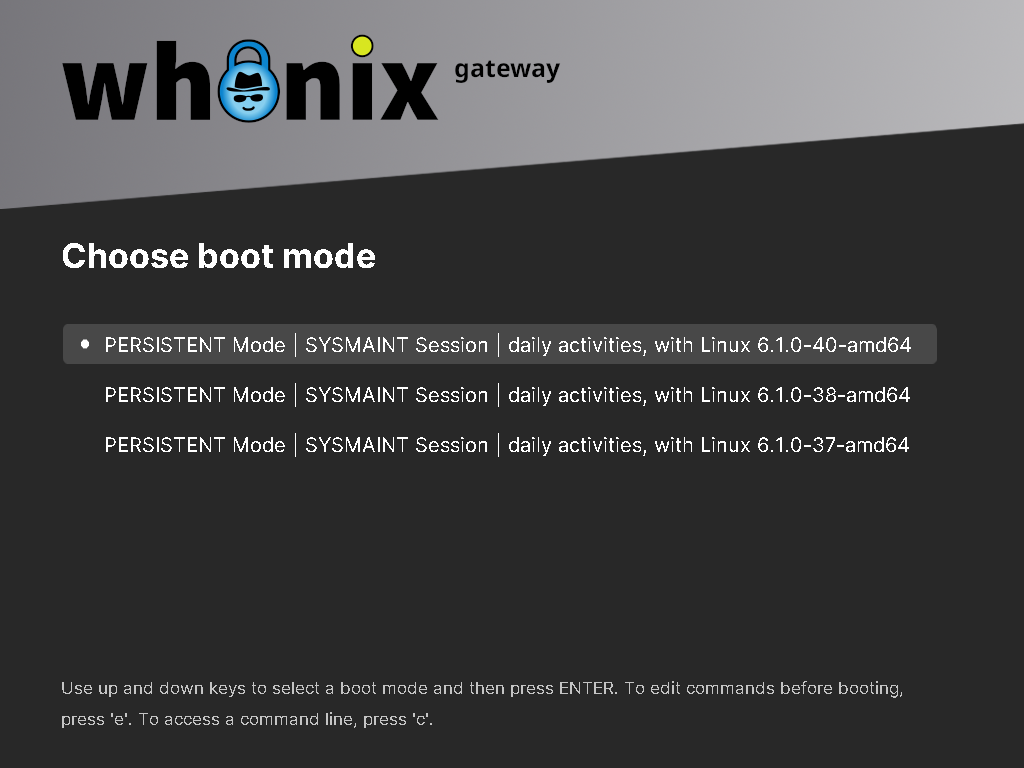
I mean, all this does is confuse me, so which one should I choose? Remember you need to make it as user friendly as possible. It’s already complicated as it is, don’t make it even more complicated. I mean do I choose Linux 6.1.0-40-amd64?

So I’m trying to update both gateway and workstation, so I fired up gateway and chose sysmaint and then I’m hit with these 3 options and I almost broke down and cried, please remember, it needs to be user friendly, why make it more and more complicated?

So why are there 3 options now? Which one do I choose?

Edit: Why did I almost cry? Cause it’s already complicated as it is! The last thing it needs is to be even more complicated. The more complicated it is, the less user friendly it becomes!

You have no idea how stressful it’s been learning how to use whonix, it’s been super stressful, it’s not easy, bare minimum you need an average IQ, bare minimum you need an average IQ to figure out how to use whonix on Linux. It can get complex. And then boom I’m hit with these 3 options and I’ve never seen it before, and I don’t know what to choose, so I almost cried out of frustration. You know those tearless cries you can get from getting frustrated, that is basically what happened to me.

It’s been super stressful learning how to use whonix, so stressful for me, that that was why I went and created the whonix tutorial over on askubuntu, to help out newbies who might be starting whonix for the first time.

It’s hard and the last thing it needs is to be made even more complicated.

So I chose “Linux 6.1.0-40-amd64” and gateway is updating right now, was that the right choice? You see I have no idea what the answer is, and that’s where my frustration comes from, whonix is hard, it’s very complex, and it’s hard for my average IQ brain to keep track of it all.

When I’m hit with something totally new and I don’t know the answer, that’s where my frustration comes from. Whonix is not easy to use. Which was why I created that whonix tutorial over on askubuntu.
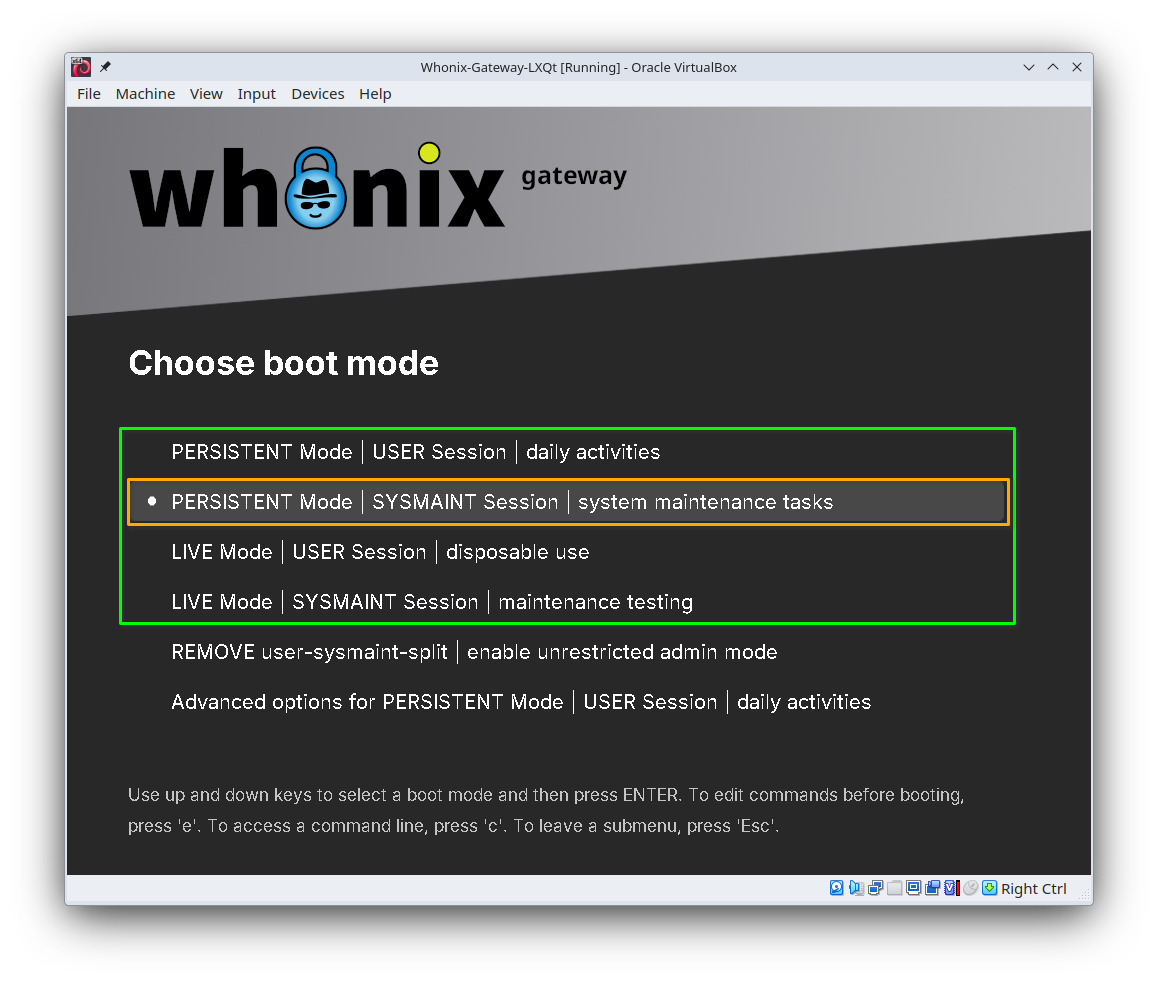
You may have hit the down arrow key a few too many times. The boot menu entries you should usually use are all at the top:

(The entries highlighted in green are the ones that you’ll usually use, the entry highlighted in orange is the one you most likely wanted to pick.)

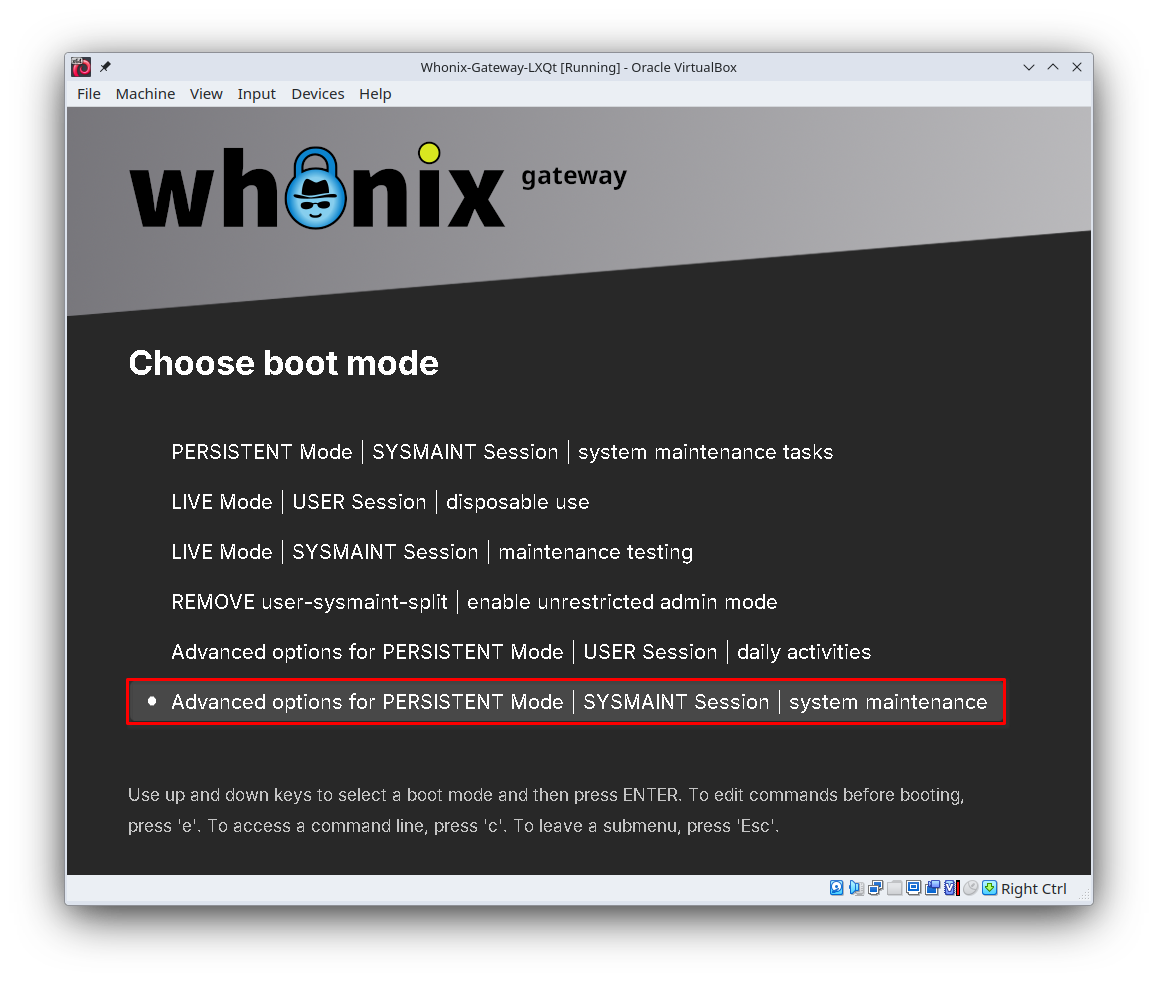
So why did you get three entries then? Probably because you picked the somewhat more-scary “Advanced options for PERSISTENT Mode | SYSMAINT Session | system maintenance” boot mode:

This one will indeed give you a number of different options to choose from.

Why does this “advanced options” mode exist? It’s because of an annoying class of issues called “kernel bugs”. Sometimes the core of the OS (the “kernel”) has problems that will make it not function right for one reason or another. If you update your system, a new kernel is installed, and then that kernel causes problems, the only good short-term workaround is to boot into an older kernel. That’s what those “6.1.0-40”, “6.1.0-38”, etc. things are; they’re kernel versions.

Why are they displayed here? Because it’s the only place where they can be displayed and actually work. The screen you’re looking at appears before the OS loads. If the screen was put anywhere else, it would only be able to show up after the OS was loaded, at which point it wouldn’t be able to work anymore.

Can’t we just remove them? Yes, technically we could. But then what would happen if someone got a kernel update and the VM refused to boot any longer? At that point you’d be left with a completely broken Whonix installation, and would be effectively locked out of your files and apps. That would be a lot worse for many people.

Yes, the menu is confusing, and yes, we don’t like it either. We actually did quite a bit of work to put all of the “Advanced options” menus at the bottom of the boot mode list, which was surprisingly difficult due to how Debian works. Previously, they were mixed in with the other boot modes, which was even more confusing.

Hopefully this makes things clearer. We did try to make this more usable!

1 Like

Why does my gateway boot menu screen look different than yours? I literally don’t have the same options as you.

Back in June or July I made this whonix tutorial on askubuntu, right here, follow the link, scroll down til you see the screenshot of the gateway boot menu, cause as you’ll see it also looks different compared to yours https://askubuntu.com/questions/1550871/how-do-i-install-whonix-on-ubuntu-24-04-lts

So yeah, I made a whonix tutorial months ago and when I was making it I took a screenshot of the gateway boot menu and back then it didn’t even have the “sysmaint session” option, check out my tutorial, I would access the system maintenance panel from inside gateway itself.

So yeah, months ago the “advanced options for persistent mode sysmaint session daily activities” wasn’t even there in my gateway boot menu, and now it is, so I chose it and this is where my confusion comes from, cause it wasn’t there before but now it is. So that’s why I chose it and then yeah, I was hit with those 3 options, and then I got super confused.

Ok so I think I understand this now. So my whonix is working just fine right? We’re still on whonix 17 right?

And of course just to verify, I was indeed supposed to choose “6.1.0-40” right?

And oh, so why does my gateway boot menu look different compared to yours?

My whonix is functioning perfectly fine?

Edit: I’m on Ubuntu 24.04 LTS. I’m using vbox 7.0.16 the GA version of it which is the version you’ll get from the Ubuntu repository, GA stands for general availability, it’s the stable version of vbox which will be frozen and stable for the duration of Ubuntu 24.04 LTS

There are two versions of vbox for Ubuntu, the GA version and the HWE version, I’m using the GA version, I also believe I’m using the GA kernel for Ubuntu 24.04 LTS, this is the kernel that’s frozen at launch and is guaranteed to be stable for the duration of Ubuntu 24.04 LTS, this is all off the top of my head, I’d have to go back and refresh my memory though.

But yeah I’m using the GA version of vbox for Ubuntu 24.04 LTS which is vbox 7.0.16

Edit: the GA kernel for Ubuntu 24.04 LTS is kernel 6.8. I’m using GA kernel 6.8 on Ubuntu 24.04 LTS

Hey I replied to you above, I don’t know if you were tagged or not. Just letting you know.

I think I see what happened here.

I’m running Whonix 18. You’re running Whonix 17. Whonix 17 didn’t install user-sysmaint-split in the gateway. However, due to a bug in Whonix 17, the entry that says Advanced options for PERSISTENT Mode | USER Session | daily activities accidentally says Advanced options for PERSISTENT Mode | SYSMAINT Session | daily activities. (We typo’d and wrote SYSMAINT where we meant USER. This is fixed in Whonix 18, it looks like the fix wasn’t backported to Whonix 17.)

At the same time, we’re also updating our documentation for Whonix 18, in large part removing documentation that is specific to Whonix 17, so that we can reasonably maintain it. Whonix 18 is out and is stable, and Whonix 17 will be deprecated soon. So I’m guessing what happened is:

  • You read documentation that was for Whonix 18, where user-sysmaint-split is installed by default in the gateway. That documentation told you to boot into a “sysmaint session”.
  • You then booted the gateway, and looked for a boot entry marked “SYSMAINT”, which happened to be the typo’d Advanced options for PERSISTENT Mode | SYSMAINT Session | daily activities button.
  • You then got given the three options, because this is an “advanced options” entry for booting into a specific kernel.

Nothing has gone awry (except perhaps for the bug, which is confusing but otherwise benign), your system should still be working just fine. You don’t have a PERSISTENT Mode | SYSMAINT Session | system maintenance tasks entry, so you don’t have user-sysmaint-split installed and don’t have to reboot into a special mode to update the gateway.

Yes. That’s the newest kernel your system happened to have, which is why it was at the top of the list of kernels. It’s the same kernel that would have been booted had you picked PERSISTENT Mode | USER Session | dailly activities.

1 Like

When did Whonix 18 come out?

I thought my whonix was the latest version?

I am very very very confused here, are you saying I’m using an older version of whonix?

So I’m using whonix 17, so when did whonix 18 come out?

Edit: I am about to pull my hair out in frustration. I’m using whonix 17 when I’m supposed to be using whonix 18? When did whonix 18 come out?

How come I wasn’t notified when a newer version of whonix came out? When I fire up whonix there should be a pop up telling me there is a newer version of whonix, and that I need to upgrade.

Seriously will someone please clear this up cause I’m about to freak out!!! I am about to get up and start screaming!!!

How is it a new whonix came out and I wasn’t aware of it?

So I’m using whonix 17 and you’re telling me I’m supposed to be using whonix 18?

I wasn’t even aware a newer version of whonix had come out!!!

There should be a pop up on whonix that tells the user that a newer version of whonix was released, cause I had no fucking clue.

I had no fucking clue whonix 18 had come out!

I’m very pissed off over this!

How is it, that I had no clue a newer version of whonix came out?

Edit: So it looks like whonix 18 was released just a few weeks ago Whonix 18.0 Privacy-Focused Linux Distro Released

There isn’t a popup informing users that they should upgrade from Whonix 17 to Whonix 18 because it’s not necessary to upgrade yet. Once Whonix 17 is deprecated, we will have a popup appear, but it isn’t critical yet. This is a pretty standard way of doing things among OS vendors; even though new OS versions are heavily tested before release, inevitably the first people to upgrade end up finding rough spots that need fixed, so it’s generally advisable to let a new release “stabilize” before pushing everyone to use it. Whonix 18 is released and considered stable, but unless you want to try it out, you don’t have to yet. When the time comes, you’ll get a popup. (Or if you are interested in using it now, you can upgrade now.)

See also:

Ok.