Hello. I don’t know where to write, so I decided to open a ticket in forum. Please tell me how to solve the problem. Whonix sometimes just doesn’t start, showing one of two errors. 1) Invalid DMI Field Header 2) failed to start systemd-modules-load-service. After one or two restarts, the problem is solved. I use VirtualBox, Windows 10 host. If you need any more information, let me know

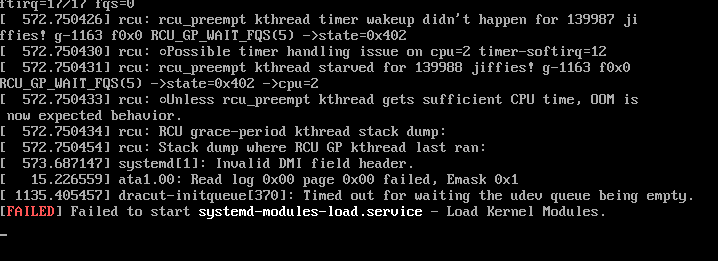
These are known, documented issues which do not break the boot. These are likely not your issue at this point. To learn more about these → Utilize Search Engines, Documentation and AI.
All messages including textual string:
rcu:
are unexpected and most likely the cause of any booting issues. These are not part of any source code developed by Whonix (or Kicksecure). Could be hardware, VirtualBox and/or host operating system issues.
It is therefore unlikely that these can be fixed by Whonix. For troubleshooting, see the General VirtualBox Troubleshooting Steps.
You’re not the only one with this the following issue:
rcpu_preempt self-detected stall on CPU
I have been able to reproduce this issue on WIndows.
Using search engines I found another user - most likely not a user of Kicksecure or Whonix - having similar issues with a Linux based VM on a Windows based host opearting system. Reference: Daily crash with virtualbox, "RCU_preempt self-detected stall on CPU" - Hardware - Home Assistant Community
You could go to VirtualBox VM settings, go to Acceleration Tab. Try different Paravirtualization Providers.
Or a different solution was suggested here: Daily crash with virtualbox, "RCU_preempt self-detected stall on CPU" - #4 by TH3xR34P3R - Hardware - Home Assistant Community
- open
cmd.exewith administrator rights - run
command:
bcdedit /set hypervisorlaunchtype off
Or use some other was to disable Hyper-V on Windows.
Disabling Hyper-V using that method however did not resolve the issue for me.
This resolved the issue for me. Now documented here:
Windows only - Virtual Machine only starts after several attempts - rcpu_preempt self-detected stall on CPU
1 Like
Based on a bit of research, RCU is basically a locking system in the kernel for situations where some bit of data may need to be read by many bits of code but updated simultaneously by one part of the code (read-mostly). What is RCU? -- “Read, Copy, Update” — The Linux Kernel documentation has a bunch of details that are mostly irrelevant here - the point is, whatever is happening is breaking the ability of the kernel to synchronize access to critical in-kernel data, and that looks like it can only happen if the CPU is fundamentally not behaving the way it should (or the kernel has a bug, but I’m guessing the former is true). Changing the paravirtualization interface I guess might fix that… maybe? I’m afraid it might just be masking a more serious issue. I’ll look into it, I have Windows installing here so I can test.
Edit: Some other documentation about RCU stalls: https://www.kernel.org/doc/Documentation/RCU/stallwarn.txt
2 Likes
Hello. Thank you very much for solving my problem, your solution helped me! Thanks for the quick response. Donate from me in a couple of months. 

2 Likes
And thank you for explaining the problem!
2 Likes
So, I finished testing this and I believe the issue is indeed Hyper-V interfering with VirtualBox.
I downloaded and installed VirtualBox, Whonix, and Kicksecure on a fresh Windows 11 Pro installation. Upon launching Whonix-Gateway, I noticed immediately that the virtualization type icon in the lower-right corner of the VirtualBox window was a green turtle, something I had never seen before. A quick search revealed that this was VirtualBox warning that it was in “slow mode”, which it apparently does in order to work around Hyper-V. (I suspect, though haven’t determined for sure, that VirtualBox is using Hyper-V to do the actual virtualization in this scenario, much like QEMU would use KVM.) As one would expect, the VM seemed to be slower than I would have expected given the hardware I was using. It did seem to function normally though.
I managed to boot Kicksecure, Whonix-Gateway, and Whonix-Workstation all at the same time, fully updated them, and then attempted to reboot all three. Upon doing this, both Kicksecure and Whonix-Gateway locked up and refused to boot. Task Manager showed both of the hung VMs using about 11% of the CPU constantly, which to me sounds like one or two threads were stuck at 100% CPU usage. Resetting the hung VMs didn’t work, they immediately re-hung. Fully shutting down and restarting a hung VM got it to power on.
After a lot of experimenting, I determined the following:
- Launching one VM and allowing it to boot fully seems to work most if not all of the time (it worked at least 10 times in a row for me).
- Attempting to launch two VMs at once usually if not always results in one of the VMs locking up during boot. This was always the first VM I double-clicked on for me.
- Pausing and unpausing a hung VM sometimes resulted in it becoming unstuck.
After all this, I decided to try to disable Hyper-V. Windows 11 Pro makes this ridiculously hard: I had to disable it in at least four different places in order to get it to actually go away:
bcdedit /set hypervisorlaunchtype offdism /Online /Disable-Feature:Microsoft-Hyper-V- Windows Security → Device Security → Core Isolation → Turn off “Memory integrity”
- Registry Editor → Computer\HKEY_LOCAL_MACHINE\SYSTEM\CurrentControlSet\Control\DeviceGuard → Set EnableVirtualizationBasedSecurity to 0
- Reboot
After doing all of that, VirtualBox started showing a blue microchip icon instead of a green turtle in the lower-right corner of VM windows, and at that point all of the hanging issues appeared to stop. I was able to launch Whonix-Gateway, Whonix-Workstation, and Kicksecure all at the same time, none of them hung and all of them seemed to be booting faster.
This did not work for me - with Hyper-V enabled on the host, when launching Gateway and Workstation at the same time with Hyper-V as the paravirtualization interface, both VMs lock up for some amount of time, Gateway stays locked up longer than Workstation and reports ..MP-BIOS bug: 8254 timer not connected to IO-APIC, Workstation reports a CPU soft lockup. Both of them did finally boot, but it took a while for them to boot, long enough I thought they were entirely hung. Similar results occurred when using the “Minimal” paravirtualization interface.
Ultimately, if one truly cannot disable Hyper-V, I think the best solution is to simply boot each VM one at a time, waiting until one VM has a working desktop before launching the next one. If on the other hand you can disable Hyper-V, doing that is much more effective and improves performance a lot.
2 Likes
This issue and a workaround is now documented here: