I updated to the latest Vbox VirtualBox-7.2.14-174565-Win.
I then opened Whonix Gateway in maintenance mode and updated it, I then opened whonix workstation in Maintenance mode and updated it. Both updated to latest Vbox additions.
Now my Monitor/desktop settings are bigger than my screen.
I have adjusted the window size, but it does not seem to adjust the resolution and I have to use the sliders on the sides and bottom to access anything, Menu/taskbar etc.
I have tried rebooting after adjusting the screen size, it goes back to oversize. It does not automatically resize when adjusting the size by dragging the sides/corner to adjust it.
I can not adjust in monitor settings, says something about Kashi(??).
Where do I make the adjustments/fixes? How?
I thought I might try manually updating VBox additions, but I can not load it or update it through the devices option in the menu.
If the display wasn’t bigger than your screen previously, it’s possible that VirtualBox’s display scaling settings got messed up. Try changing the “scale factor” setting described here:
If your scale factor is already set to 100% (i.e. no scaling), you might be running into the fact that dynamic resolution resizing is disabled in Whonix-Workstation by default now for privacy reasons (the exact size of your workstation window can be a fingerprinting vector). If you don’t mind this, you can enable dynamic resolution resizing by following the instructions at:
You shouldn’t need to do this; Whonix contains VirtualBox Guest Additions out of the box. Installing them manually can cause conflicts (and requires enabling a virtual optical drive which increases attack surface), therefore it is not recommended.
I just realized you’re the same person who posted:
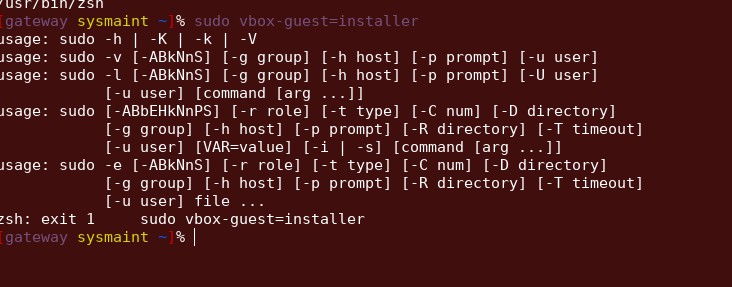
That post indicates that your Guest Additions are broken, which would also cause this issue. Disregard my above reply, things may start working after running sudo vbox-guest-installer as described in my comment on your other post.
The command you typed on the gateway is misspelled. You have:
sudo vbox-guest=installer
#              ^ note the equals sign here
You should have:
sudo vbox-guest-installer
#              ^ dash, not equals
That’s expected and is not a problem. You’ll get the update to 7.2.14 Guest Additions or later when we push it out. Newer VirtualBox is usually backward-compatible with older Guest Additions, so there shouldn’t be a problem.