Hello. I cloned a workstation, I need to change the local address to 10.152.152.11 so that the two stations don’t conflict with each other. How to do it correctly?
3 Likes
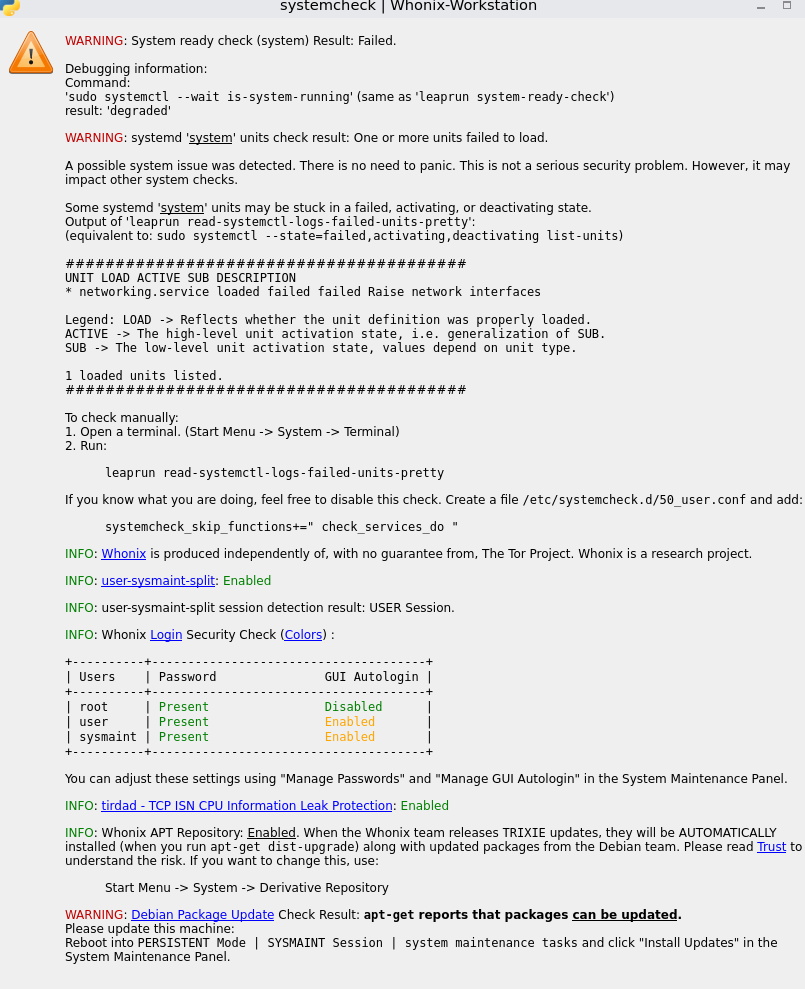
I changed the local ip address, but when I start the cloned workstation I get an error. Help fix this, I’m new to Linux.
Please share the full contents of all files that you changed. It would also be useful to see the output of sudo journalctl -u networking.service (you will have to run that from within sysmaint mode).
2 Likes
июл 18 14:10:46 host systemd\[1\]: Starting networking.service - Raise network interfaces…
июл 18 14:10:48 host ifup\[1440\]: Waiting for DAD… Done
июл 18 14:10:48 host systemd\[1\]: Finished networking.service - Raise network interfaces.
июл 18 14:11:09 host systemd\[1\]: Stopping networking.service - Raise network interfaces…
июл 18 14:11:09 host ifdown\[4719\]: RTNETLINK answers: No such process
июл 18 14:11:09 host ifdown\[4721\]: Error: ipv6: address not found.
июл 18 14:11:09 host systemd\[1\]: networking.service: Deactivated successfully.
июл 18 14:11:09 host systemd\[1\]: Stopped networking.service - Raise network interfaces.
– Boot 776bcb342e5d4be3bed68d0b5f9d9607 –
июл 18 14:11:35 host systemd\[1\]: Starting networking.service - Raise network interfaces…
июл 18 14:12:34 host ifup\[1435\]: Waiting for DAD… Done
июл 18 14:12:34 host systemd\[1\]: Finished networking.service - Raise network interfaces.
июл 18 14:23:21 host systemd\[1\]: Stopping networking.service - Raise network interfaces…
июл 18 14:23:22 host ifdown\[8060\]: RTNETLINK answers: No such process
июл 18 14:23:22 host ifdown\[8062\]: Error: ipv6: address not found.
июл 18 14:23:22 host systemd\[1\]: networking.service: Deactivated successfully.
июл 18 14:23:22 host systemd\[1\]: Stopped networking.service - Raise network interfaces.
– Boot 483fc44ae7724959b53981e8df1f05b7 –
июл 18 14:23:46 host systemd\[1\]: Starting networking.service - Raise network interfaces…
июл 18 14:26:43 host ifup\[1341\]: Waiting for DAD… Done
июл 18 14:26:43 host systemd\[1\]: Finished networking.service - Raise network interfaces.
июл 18 14:49:41 host systemd\[1\]: Stopping networking.service - Raise network interfaces…
июл 18 14:49:41 host ifdown\[7506\]: RTNETLINK answers: No such process
июл 18 14:49:41 host ifdown\[7508\]: Error: ipv6: address not found.
июл 18 14:49:41 host systemd\[1\]: networking.service: Deactivated successfully.
июл 18 14:49:41 host systemd\[1\]: Stopped networking.service - Raise network interfaces.
– Boot dc0980bd786d4c9e897f7394de2f58c6 –
июл 18 14:55:07 host systemd\[1\]: Starting networking.service - Raise network interfaces…
июл 18 14:52:42 host ifup\[1421\]: Waiting for DAD… Done
июл 18 14:52:43 host systemd\[1\]: Finished networking.service - Raise network interfaces.
июл 18 14:56:50 host systemd\[1\]: Stopping networking.service - Raise network interfaces…
июл 18 14:56:50 host ifdown\[4483\]: RTNETLINK answers: No such process
июл 18 14:56:50 host ifdown\[4485\]: Error: ipv6: address not found.
июл 18 14:56:50 host systemd\[1\]: networking.service: Deactivated successfully.
июл 18 14:56:50 host systemd\[1\]: Stopped networking.service - Raise network interfaces.
– Boot 38a9bd71472a4af7815bee5a3c0ac289 –
июл 18 15:03:33 host systemd\[1\]: Starting networking.service - Raise network interfaces…
июл 18 15:03:01 host ifup\[1340\]: Waiting for DAD… Done
июл 18 15:03:01 host systemd\[1\]: Finished networking.service - Raise network interfaces.
июл 18 15:04:20 host systemd\[1\]: Stopping networking.service - Raise network interfaces…
июл 18 15:04:20 host ifdown\[2901\]: RTNETLINK answers: No such process
июл 18 15:04:20 host ifdown\[2903\]: Error: ipv6: address not found.
июл 18 15:04:20 host systemd\[1\]: networking.service: Deactivated successfully.
июл 18 15:04:20 host systemd\[1\]: Stopped networking.service - Raise network interfaces.
– Boot a6e3cf042b5e40f98b857da6507d345e –
июл 18 15:04:38 host systemd\[1\]: Starting networking.service - Raise network interfaces…
июл 18 15:07:16 host ifup\[1357\]: Waiting for DAD… Done
июл 18 15:07:16 host systemd\[1\]: Finished networking.service - Raise network interfaces.
июл 18 15:09:56 host systemd\[1\]: Stopping networking.service - Raise network interfaces…
июл 18 15:09:56 host ifdown\[4338\]: RTNETLINK answers: No such process
июл 18 15:09:56 host ifdown\[4340\]: Error: ipv6: address not found.
июл 18 15:09:56 host systemd\[1\]: networking.service: Deactivated successfully.
## Copyright (C) 2012 - 2025 ENCRYPTED SUPPORT LLC <adrelanos@whonix.org>

## See the file COPYING for copying conditions.

#### meta start

#### project Whonix

#### category networking

#### non_qubes_whonix_only yes

#### workstation_only yes

#### description

## network interfaces configuration eth0 to communicate with Whonix-Gateway

##

## static network configuration

##

## IP HARDCODED but not need to change since only comment.

#address 10.152.152.11
#netmask 255.255.192.0
#gateway 10.152.152.10

#### meta end

## for more information see interfaces(5)

## Loopback interface.

auto lo
iface lo inet loopback

## When using Virtual Machines (not Physical Isolation),

## - eth0 is an internal, isolated, virtual network

## - provided and only visible inside Virtual Machines

## - solely used to communicate with the Gateway

## - it has no access to the host.

## - Thus, the following IP address can NOT cause conflicts

## with your LAN network or router.

auto eth0
iface eth0 inet static
## Increment last octet of address
## on optional additional workstations.
## IP HARDCODED unfortunately.
address 10.152.152.17
netmask 255.255.192.0
gateway 10.152.152.10

   ## Out commented.
   ## For what do we require the network and broadcast
   ## instances anyway?
   #network 192.168.0.0
   #broadcast 192.168.0.255

## If we had a DHCP server running on Gateway’s

## network interface eth1, we could alternatively use DHCP.

## It has not been researched yet, if that were safe, or if

## DHCP has in context of anonymity linux distributions any

## odd features, such as “tell me the IP of your upstream router”.

#auto eth0
#iface eth0 inet dhcp

iface eth0 inet6 static
address fd19:c33d:88bc::11
gateway fd19:c33d:88bc::10
netmask 96
1 Like
It looks like a ipv6 problem.
- What virtualization software are you using?
- Have you regenerated the MAC address for the new workstation?
Each additional Whonix-Workstation VM must have its own MAC address and internal LAN IP address.
- You have set a 10.152.152.17 ip. The guide recommend to set a .12 and progressively, I don’t know wheter it can cause any issue.
1 Like
It looks like the problem is in the address fd19:c33d:88bc::11, I changed it to the address fd19:c33d:88bc::17 and the error is gone. I need advice from an understanding person, did I do the right thing?
1 Like
That looks like the right thing to do. Under VirtualBox, IPv6 is enabled by default. If you have two Whonix-Workstation VMs running at the same time and using the same IPv6 address, something will break, and it looks like indeed something did break. Changing the IP is the right way to fix that, which is what you did, so I think you’re good to go.
The documentation appears to be missing these instructions. I’ll edit them in.
1 Like