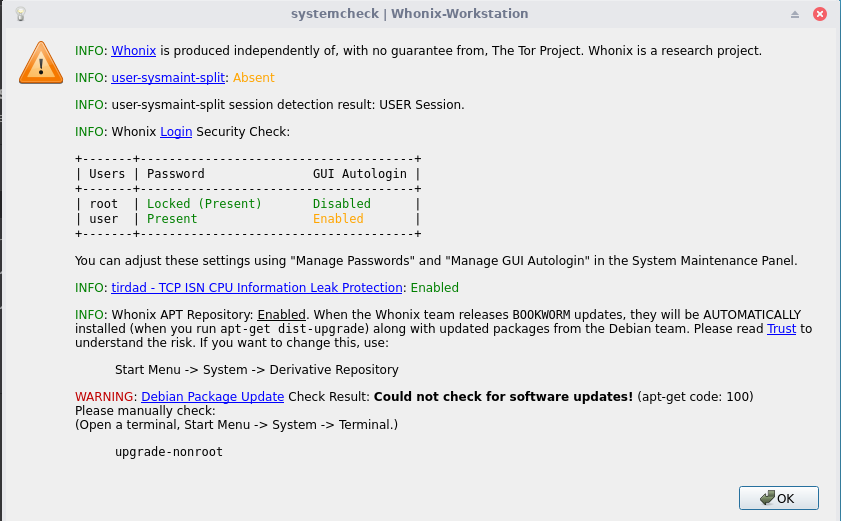
Hello! When I try to update my Gateaway I get this Error that Im using an old Repository “invalid EXPKEYSIG CB8D50BB77BB3C48 Patrick Schleizer ”
This is what Im getting –
W: An error occurred during the signature verification. The repository is not updated and the previous index files will be used. GPG error: tor+https://deb.whonix.org bookworm InRelease: The following signatures were invalid: EXPKEYSIG CB8D50BB77BB3C48 Patrick Schleizer adrelanos@kicksecure.com
W: An error occurred during the signature verification. The repository is not updated and the previous index files will be used. GPG error: tor+https://deb.kicksecure.com bookworm InRelease: The following signatures were invalid: EXPKEYSIG CB8D50BB77BB3C48 Patrick Schleizer adrelanos@kicksecure.com
E: Failed to fetch tor+https://deb.kicksecure.com/dists/bookworm/InRelease The following signatures were invalid: EXPKEYSIG CB8D50BB77BB3C48 Patrick Schleizer adrelanos@kicksecure.com
E: Failed to fetch tor+https://deb.whonix.org/dists/bookworm/InRelease The following signatures were invalid: EXPKEYSIG CB8D50BB77BB3C48 Patrick Schleizer adrelanos@kicksecure.com
E: Some index files failed to download. They have been ignored, or old ones used instead.
zsh: exit 100 sudo apt-get update”
YES! I am getting the EXACT same error on all of my whonix-workstation-17 templates. Can someone please tell me whats going on? I don’t think it’s a MITM attack. How can I debug and fix this
?” Why is this happening?
So if I understand the documentation correctly, whonix-workstation-17 is deprecated, and the only way to fix this is to upgrade Qubes to 4.3, and then do a whonix-17 release-upgrade via `do release-upgrade’ from the terminal?
sudo http_proxy=http://127.0.0.1:8082 https_proxy=http://127.0.0.1:8082 curl --tlsv1.3 --output /usr/share/keyrings/derivative.asc --url ``https://www.kicksecure.com/keys/derivative.asc % Total % Received % Xferd Average Speed Time Time Time Current Dload Upload Total Spent Left Speed 100 82946 100 82946 0 0 60673 0 0:00:01 0:00:01 --:–:-- 60677
sudo torsocks curl --output /usr/share/keyrings/derivative.asc --url ``http://www.w5j6stm77zs6652pgsij4awcjeel3eco7kvipheu6mtr623eyyehj4yd.onion/keys/derivative.asc % Total % Received % Xferd Average Speed Time Time Time Current Dload Upload Total Spent Left Speed 0 0 0 0 0 0 0 0 --:–:-- --:–:-- --:–:-- 0 0 0 0 0 0 0 0 --:–:-- --:–:-- --:–:-- 0 curl: (7) Failed to connect to ``www.w5j6stm77zs6652pgsij4awcjeel3eco7kvipheu6mtr623eyyehj4yd.onion`` port 80 after 0 ms: Couldn’t connect to server zsh: exit 7 sudo torsocks curl --output /usr/share/keyrings/derivative.asc --url
Maybe you can fix this too?
Glad this fixed things, however, my biggest concern, is why this is happening to whonix-workstation-17 users when whonix-workstation-17 is not at EOL yet. Why did this happen to every one of my whonix-workstation-17 Templates all of a sudden? Is this happening to every whonix-workstation-17 template user or is it a mostly isolated incident? Very poor engineering to leave it to the end user to fix this. How can we be sure this doesn’t happen again?
Hey Patrick, thanks for all you do. Cryptography is an important part of the security guarantees of Whonix and Qubes, and I’m a bit curious about the story here.
I installed the new derivative.asc. I noticed that it’s about one 9th of the previous key’s length. Did you change the algorithm you used to generate the key?
Why has your key changed between 17 and 18? Does this happen with ever major upgrade? Admittedly I’ve never had to manually upgrade Whonix, so this is a new experience for me. Nobody seems surprised, but I’d like to know.
On this ( EXPKEYSIG ) page I noticed “Users can check Kicksecure Signing Key for better security.” Unfortunately that page was very confusing. First, it has two main links, and I don’t know which one to investigate. Choosing the “apt repository” link, there was no option for Qubes. Choosing “Kicksecure or Whonix” I discovered the verification is for downloaded images, not the apt repository key I just downloaded. I guess my point is, it is not clear at all to an average user (me) how to verify the key you’ve provided. Since it seems like a crucial key, I would like to somehow verify it.
I’m going to await your answer before using the new key to update my 17 era qubes.
Again, thanks to you Patrick and the whole Whonix team and everyone here.
Given the current state of available resources, I am not a fan of any kind of legacy / oldstable support. However, in https://github.com/QubesOS/qubes-issues/issues/10219 I got a request to do this in Qubes and concluded “it’s simple enough”, since CVEs in Kicksecure / Whonix haven’t been recorded yet. Formally saying “we push a security upgrade for the unlikely case that someone reports a security bug against oldstable” seemed simple enough.
However, once a new stable version is released, I am using that new version and not oldstable. So all my focus shifts to the new stable version.
And there isn’t a contributor spending brain cycles on oldstable making sure it keeps churning around. I don’t have any free mental bandwidth to keep oldstable in mind.
Size “for the most part” doesn’t matter.
Someone posted an SSH private key as example on the internet. (Source: [1]) It’s even shorter.
Or even more beautiful in cryptocurrency there are mnemonic phrases. Example [2]:
hotel obvious agent lecture gadget evil jealous keen fragile before damp clarify
These are literally used to protect value worth millions of $ USD. These short keys aren’t considered factor X less secure just because they are factor X smaller in size than OpenPGP.
Debian trixie comes with gpg version 2.4, a newer version than previously. Gpg 2.4 introduced a lot of improvements. Among these are “v5 keys”.
I didn’t investigate the file size of the key. Instead, I assumed that gpg was previously less optimized for small key sizes because it’s a much older project that was invented long before very short yet very secure keys were common. Now it has improved with more space efficient encoding.
I only checked that the key fingerprint is the same, that signing/encrypting/decryption is functional, and that third-party signatures on the key are being retained and still verifiable. Only a basic functionality test, not a deep dive into the internals of gnupg.
An expected reply could be “but you should have checked that”. I am afraid, this isn’t how this works. For instance, if you asked the gnupg developers if they fully understand and regularly audit the Linux kernel or the C compiler - because if these were backdoored, then their work would be in vain - I suspect the answer would also be “no”. There’s a number of issues making a full end-to-end audit unrealistic.
So realistically, what one can do is either a deep dive and become a cryptographer, or more or less trust that the cryptographers do an okay job in the field of cryptography.
The word “can” was deliberately chosen to make it optional. Perhaps it should say “Optional: Advanced Users can …” instead. It’s not very realistic for non-technical users to grasp this. Why that is so, see:
It used to happen only when the key got extended, which wasn’t for every release.
Your typical answers are terse, so this one seems out of character. I’m guessing my questions irritated you. I’m sorry if that’s the case. It wasn’t my intention. I appreciate your answers and your hard work. Please bear with me.
Size of the key [+ huge explanation]
I didn’t ask that as a gotcha, just simply curious. If the fingerprint is the same, then you don’t mind posting that fingerprint, and directing us to commands that verify that. Pre-accusing me of accusing you of “but you should have checked that” is unnecessarily aggressive, and doesn’t help me or anyone else verify the key. As you know I’ve not engaged with you in extended back-and-forths. I’ve never badgered you or accused you of anything. I’m not even accusing you of anything now.
We’re the ones being asked to replace an existing key with a new one. It’s our asses on the line if something is wrong. You say it’s the same key, and yet we have to change it. The story about why the key length is so radically different is just part of the story of how and why the key changed. It’s true I’m not an expert in cryptography. So that is why I asked that question.
For reference, a good answer would have been “here is the algorithm I used, the version of GPG I used, here’s why my key changed, here’s why the length changed. Here’s why the length change doesn’t matter. Here is how to verify the key.”
It’s the very same key
Then why are we changing it, and why do we have to verify it? I don’t mean the switch from 17 to 18. I mean the cryptographic reason.
different expiration date
So the key changed.
It was an oversight
Okay, no problem.
Trust the cryptographer
I’m using Qubes+Whonix 17. Show me the command for verifying the new key. ←This is the important part.
Non-technical users often struggle
But it’s also true the documentation is itself complicated, formed of many on and off ramps, asides, warnings and caveats, etc. I guess what I’m saying is, it would be nice for there to be a link to a specific set of commands that verify the new key, since we’re all being expected to slip this one into our existing systems. It’s not something I’ve ever had to do before with Qubes or Whonix, so I want to be sure.
I’ll re-read your reply here and will return to the documentation and try to figure out how to verify the key.
According OpenPGP Best Practices on Riseup.net (archived)1, yes, it is possible, and there don’t seem to be any recommendations against it:
People think that they don’t want their keys to expire, but you actually do. Why? Because you can always extend your expiration date, even after it has expired! This “expiration” is actually more of a safety valve or “dead-man switch” that will automatically trigger at some point. If you have access to the secret key material, you can untrigger it. The point is to setup something to disable your key in case you lose access to it (and have no revocation certificate).
So expiry is both a common feature of PGP/GPG keys, but also something easy to extend.
# Old Key

  /usr/share/keyrings
  $ ls -al derivative.asc~
-rw-r--r-- 1 root root 77312 Jun 20  2024 derivative.asc~

  /usr/share/keyrings
  $ gpg --show-keys derivative.asc~
gpg: keybox '/home/user/.gnupg/pubring.kbx' created
pub   rsa4096/0x8D66066A2EEACCDA 2014-01-16 [SC] [expired: 2026-01-23]
      916B8D99C38EAF5E8ADC7A2A8D66066A2EEACCDA
uid                              Patrick Schleizer <adrelanos@kicksecure.com>
uid                              Patrick Schleizer <adrelanos@riseup.net>
uid                              Patrick Schleizer <adrelanos@whonix.org>
sub   rsa4096/0x3B1E6942CE998547 2014-01-16 [E] [expired: 2026-01-23]
sub   rsa4096/0x10FDAC53119B3FD6 2014-01-16 [A] [expired: 2026-01-23]
sub   rsa4096/0xCB8D50BB77BB3C48 2014-01-16 [S] [expired: 2026-01-23]

# New Key

  /usr/share/keyrings
  $ ls -al derivative.asc.new
-rw-r--r-- 1 root root 8704 Jan 30 11:39 derivative.asc.new

  /usr/share/keyrings
  $ gpg --show-keys derivative.asc.new
pub   rsa4096/0x8D66066A2EEACCDA 2014-01-16 [SC]
      916B8D99C38EAF5E8ADC7A2A8D66066A2EEACCDA
uid                              Patrick Schleizer <adrelanos@whonix.org>
uid                              Patrick Schleizer <adrelanos@kicksecure.com>
uid                              Patrick Schleizer <adrelanos@riseup.net>
sub   rsa4096/0x10FDAC53119B3FD6 2014-01-16 [A]
sub   rsa4096/0xCB8D50BB77BB3C48 2014-01-16 [S]
sub   rsa4096/0x3B1E6942CE998547 2014-01-16 [E]
The keys as described here are exactly the same, with two differences:
Size: the old key is about 9x times bigger.
The new key has no expiry notices.
I inquired with an AI about the reasons why the same key might have different sizes. It offered the following points (paraphrased by me):
Old key may have more metadata
Old key may have multiple certifications from other keys
Old key may be ASCII while new key is binary (irrelevant)
I noticed there was a lot more information in the old key. Specifically, there were a lot more :signature packet:s. Using grep with the --list-packets output, I counted 6 :signature packet: references in the new key, vs 122 in the old key. I tried listing the signatures for each key, but received an error: gpg: error reading key: No public key.
I poked around some more, and the AI informed me that issuer key ID “is the unique identifier of the key that signed the data or created a signature.” I searched for this in both keys, and discovered that the old key has 102 unique issuer key IDs, while the new key has 0. This suggests that the old key was signed by many people, while the new key has not been signed by anybody.
This is what explains why the sizes of the two keys are radically different. The significance of this difference is up for debate.
I asked the AI why someone would reissue an expired key with none of the original signatures. It offered the following points (paraphrased by me):
Fresh start
Revocation of compromised key
Not interested in carrying over previous endorsements
Doubts about integrity about previous signatures
Wants new signatures
Misconfiguration or oversight ← ???
So the upshot is, the key is the same while also being curiously different.
Just looked at the page in question, looks like a historical artifact. Both the “main” and “KVM” links pointed to the same wiki page. I’ve combined them into one link now, so it should be more clear. The page that ultimately contains the instructions is:
Maybe the intermediary page can be cut out entirely. It might not be redundant, since if a new image type is added in the future and needs a separate key for some time, we’ll want to give that key a separate page and make the “master” page link to it like it used to link to the KVM signing key verification page.
The verification instructions should be the same as if you were verifying the key for the first time. If you are familiar with the use of PGP software, you can also verify that the fingerprint of the old and new key files match, indicating they contain the same key. This has now been added to step 4 of:
That’s the problem. Getting into “why key length changed” gets into more and more complicated details.
Reason for changing: Because the key expired. The key has been extended. It depends on the definition of “the same key”. It’s the same key fingerprint, key owner, algorithm, but a different expiration date. So it would also be correct to say it’s not “the very same key”. In GnuPG terminology, it seems this is considered “the same key but extended”.
(The same challenges exist when initially installing Debian (non-Qubes), Fedora, Ubuntu, Qubes etc.)
In other words, to gain the security benefits of key verification, you need to know how to perform key verification without relying on TLS/onion such as by asking forums, AI, etc.
I could write commands that someone could copy/paste without their own technical understanding, or even provide a script. But using these commands is no more secure than copying the signing key without verification, and the script would actually be even less secure.
In other words, if you must ask how to do it, you likely cannot do it securely.
Unless the user knows how to verify the signing key through the OpenPGP Web of Trust, this technique ultimately relies on a correct download of the signing key and signature, and thus on HTTPS.
OpenPGP verification instructions
We removed the instructions to verify downloads with OpenPGP because:
Without advanced knowledge of OpenPGP, verifying with OpenPGP provides the same level of security as the JavaScript verification on the download page, while being much more complicated and error-prone.
None of our personas would have enough knowledge of OpenPGP to use the OpenPGP Web of Trust with confidence.
Providing basic (and never exhaustive) instructions has proven to be very time consuming to our help desk and technical writers. See #17900.
There seems to be literally no way to make the documentation on that topic uncomplicated.
There are some things which are so complicated they cannot be learned through documentation alone. Read a book and become a heart surgeon? No way. Become “at least” a general practitioner? Also no way. Learning by doing, sitting together in the office of a general practitioner for years: can doctor skills be learned through on the job training, listen, observe and imitate? Also no way. In many countries it requires about 12 years of study. Now maybe that could be compressed or some bright minds could learn it faster but it still cannot be compressed to 1 year. In any case, there is no way to “write simple documentation”.
Now that’s a bit far fetched. Learning the OpenPGP Web of Trust probably won’t take years of study. I would guesstimate it would take several hours or days and may require a teacher. There may be OpenPGP courses and cryptoparties (at least used to exist). I mention this to illustrate there is no way to have simple documentation for this complex topic.
I didn’t accuse you. Therefore, I worded it as:
I don’t know if you would have posted the expected reply, and that doesn’t matter. In my experience, this reply is highly likely something that would come up in the mind of a reader or might even be posted as a comment.
And often I reply not only to what a specific user asked but with a general audience in mind.
While I was holding that thought, I decided it would be good to complete the post right now with highly-likely follow-up comments, to avoid having to rehash and address this later.
But none of that should matter in the case of Qubes. You were implicitly trusting the old signing key. The “new” (a matter of terminology whether “new” or “extended”) signing key doesn’t include third-party signatures. It’s the same key fingerprint, and this is sufficient to verify.
This, however, is an issue for non-Qubes advanced users who want to initially bootstrap the signing key through the OpenPGP Web of Trust when attempting to establish a trust path to the key.
The above sentence requires a lot of background knowledge mentioned above at number [1] to make sense. If an advanced user with knowledge of the OpenPGP Web of Trust is affected, they can open a separate forum thread.
Yet another way for Qubes users to completely ignore avoid any key issues: Get on Qubes R4.3 + Qubes-Whonix 18.
Still have problems with that key signature thing.
The following signatures couldn’t be verified because the public key is not available: NO_PUBKEY 401E790E060BB00E E: Some index files failed to download. They have been ignored, or old ones used instead. zsh: exit 100 upgrade-nonroot
What should I do to fix that ? I am using whonix 17
[workstation user ~]%  upgrade-nonroot
Hit:1 tor+https://deb.kicksecure.com bookworm InRelease
Hit:2 tor+https://deb.debian.org/debian bookworm InRelease
Hit:3 tor+https://updates.signal.org/desktop/apt xenial InRelease
Hit:4 tor+https://deb.debian.org/debian bookworm-updates InRelease
Get:5 tor+https://deb.loki.network bookworm InRelease [4705 B]
Hit:6 tor+https://deb.debian.org/debian-security bookworm-security InRelease
Hit:7 tor+https://deb.debian.org/debian bookworm-backports InRelease
Err:5 tor+https://deb.loki.network bookworm InRelease
  The following signatures couldn't be verified because the public key is not available: NO_PUBKEY 401E790E060BB00E
Hit:8 tor+https://deb.whonix.org bookworm InRelease
Get:9 tor+https://fasttrack.debian.net/debian-fasttrack bookworm-fasttrack InRelease [12.9 kB]
Get:10 tor+https://fasttrack.debian.net/debian-fasttrack bookworm-backports-staging InRelease [12.9 kB]
Fetched 30.5 kB in 2s (16.0 kB/s)
Reading package lists... Done
W: An error occurred during the signature verification. The repository is not updated and the previous index files will be used. GPG error: tor+https://deb.loki.network bookworm InRelease: The following signatures couldn't be verified because the public key is not available: NO_PUBKEY 401E790E060BB00E
E: Failed to fetch tor+https://deb.loki.network/dists/bookworm/InRelease  The following signatures couldn't be verified because the public key is not available: NO_PUBKEY 401E790E060BB00E
E: Some index files failed to download. They have been ignored, or old ones used instead.
zsh: exit 100   upgrade-nonroot
[workstation user ~]%