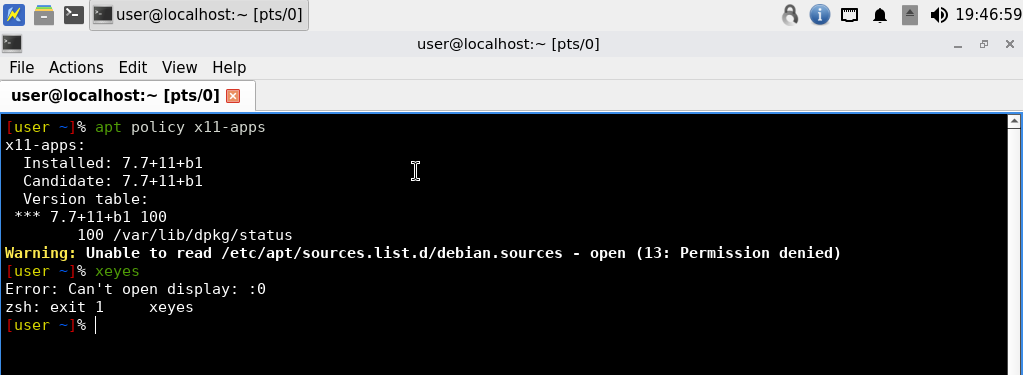
Strange, it works here:

edit: Unrelated, /etc/apt/sources.list.d/debian.sources should have permissions 644. Not sure why yours seems to have more restrictive permissions, I’ve seen this pop up a few times before but believed that was resolved.
No clue, touched nothing, KS upgraded to newest.
Maybe faster/easier to install newer version of KS from scratch and check if i will have the same results.
xpdf no longer installed by default. (18.0.6.5 and above.)
I added some more safeguards to prevent this. Next build will show if this is resolved. (18.0.6.5 and above.)
Mystery about VLC resolved, perhaps.
Leftover. Historical ticket: VLC X11 Decoding by default
Will be fixed in 18.0.8.9 (and above) by default.
xterm/uxterm not removed yet.
xterm/uxterm not removed yet.
How about Alacritty terminal client? It seems to support wayland.
A side note: I am on Qubes-Whonix 18. Tried qterminal. It is, simply
put, horrible. It doesn’t respect my dotfiles at all, which drives
me insane, it overwrites my changes to
~/.config/qterminal.org/qterminal.ini file upon every close of the
qterminal window.
- non-Qubes: No such issue.
xtermis not installed by default in non-Qubes. - Qubes version:
xtermis a “lose” installed by default package. “Lose” meaning no Kicksecure or Whonix metapackageDepends:on it. Therefore easily uninstallable usingapt. This is probably Qubes upstream issue:- (Re)move Debian packages in `packages.list` and `packages_minimal.list` · Issue #6566 · QubesOS/qubes-issues · GitHub
- Even Qubes Debian minimal comes with xterm by default: qubes-builder-debian/template_debian/packages_minimal.list at master · QubesOS/qubes-builder-debian · GitHub
- xterm is even an undeclared dependency in Qubes. It’s the only terminal emulator supported by
qubes-console-dispvmat the time of writing. (See also Qubes Root Console.) - I don’t think we’ll get rid of xterm in the Qubes version until Qubes implements Use Wayland instead of X11 to increase performance and improve security · Issue #3366 · QubesOS/qubes-issues · GitHub
Its for minimal based Qubes, because there is no DE terminal by default installed (only in full versions). Thats why for KS/Whonix we dont need it because we have DE terminal installed by default.
This isn’t really a solution as much of a workaround, but you could edit the file using Featherpad. That will likely get the settings to stick.
Alacritty isn’t a user-friendly terminal in my experience. You have to learn keyboard shortcuts to control it, you aren’t given GUI buttons. QTerminal is an LXQt application, which is why it was picked, but if there’s another terminal that is more usable (or better for security), we could use that instead. For instance, we use loupe (an image viewer designed for GNOME) because of its sandboxed image rendering code, rather than using lximage-qt which is C++/Qt based.
It is impossible to use qubes-console-dispvm except with xterm until/if Qubes implements qvm-console-dispvm - different or configurable default terminal emulator other than xterm · Issue #9876 · QubesOS/qubes-issues · GitHub.
Hmm not sure why we need to use this method while we have qvm-run option?
qubes-console-dispvm lets you access the actual console of a Qubes VM (/dev/hvc0), as opposed to accessing a pseudoterminal in a graphical window. The main reason that’s useful is because it lets you access a VM even if the GUI agent is completely broken or you are trying to avoid the dangers of running a qubes root console via X11.
xterm needs to be installed in the VM connecting to the console, not the VM providing the console. So if someone’s default management DispVM is based on Fedora, the Fedora template will need to have xterm installed. If someone sets Kicksecure as their default management DispVM, and xterm isn’t installed, it will break the “Open console in qube” feature for all qubes, not just for Kicksecure qubes. (We also don’t want this feature broken for Kicksecure qubes because the GUI agent can break, just like graphical login can break.)
X11 is what we have on Qubes OS for the time being, so there’s no reason to avoid X11 there yet (though that day will hopefully come). We don’t want to break a Qubes feature for everyone, so we should keep it available.
Since this is only affecting Qubes, I think we can skip this package until Qubes fixes their issue.
None of our code installs it. It comes by default with Qubes templates, Qubes OS’s infra itself is adding it only to Qubes images. We would have to intentionally strip it out, which as described above will break a feature (and that’s if the only thing it breaks is the feature; it might break metapackages or other functionality too, though I haven’t checked). xterm isn’t present on our non-Qubes Wayland images, so there’s no need to remove it there.