Please keep the storage pool solution I had mainlined. Any finagling with the XML to adjust hardcoded paths, to boot the VMs are a usability hit we cannot afford.
The problem is that storage pools are non-functional by default on a fresth Debian trixie installation.
I have written a deterministic, reproducible CI script running on Debian trixie referenced in post #72 that shows exactly that.
Additional commands are required to set up storage pools on Debian trixie. The commands required seem a bigger usability hit than the awful hardcoding for storage paths to /home/user.
Just so we are clear about the problem and to avoid a wild goose chase for a solution:
I installed libvirt and qemu inside a Whonix VM to see where the problem is. Apparently the current documented commands don’t cause virt-manger to show a qemu:///session by default and so the storage folder is never created - a symptom of that issue. Importing the XML doesn’t create this connection.
It is only when I explicitly add this type of connection in the virt-manger GUI, that it creates the appropriate folders under .local.
So TL’DR we need to figure out what libvirt config to change for it to connect to qemu session by default
1 Like
This command adds and auto connects to a qemu session and indeed generates the storage pool folder under user local from scratch. No need to fiddle about with directory creation or virsh storage pool commands
virt-manager -c qemu:///session
3 Likes
Nice, will test and report back
2 Likes
Worked but not out of the box, needs additional packages, different path (wont be created by default).. wiki adjustments. Will add them.
1 Like
I was able to run the VMs without the need for this step, any useful out of it for qemu session? because VMs are fully functional after importation without these commands (internet, sound..).
1 Like
Changes has been added for Whonix and KS wikis, explicit/hardcoded path removed.
except adding user on whonix side, which i can remove if not needed anymore.
Would be helpful if you explain what you’re doing here. What additional packages are you talking about? virt-manager should be part of the packages being downloaded for the setup.
That misses the purpose of my last post. It was necessary to automate the storage pool creation so users can move the images to an existing location. Also needed for automated setups like Kicksecure hosts, It has nothing to do with VM functionality or boot ability.
Again please explain in detail here what is going on. Why do you need to add a user account for this setup when the whole point is to be able to get this running on the default unprivileged user account?
libvirt-daemon-driver-qemu and libvirt-daemon-driver-storage Added, as VMs wont start without them.
KVM-VM settings is pointing to default storage pool which uses this path ~/.local/share/images, so now we dont need to add the path inside VM settings (which is good), BUT the path is different because we were pointing it to /.local/share/libvirt/images/ (read the above comments), but now /libvirt/ not needed. Also the path wont be created by default, so user must create the path manually. All these changes i mentioned reflected on the wiki here:
So i assume by automate you mean that the default storage pool will point to ~/.local/share/images and thats correct.
You understand me the opposite, i dont need to add user account, but in our wiki we have this step:
This part is inherited from qemu:///system wiki, so shall i remove it since we seems to not need it anymore?
1 Like
OK so apparently newer vesions of virt-manager have changed the path since I’ve added the connection years ago. That’s fine.
However this path (~/.local/share/images) was generated when running the virt-manager command to add a session connection. I reproduced it several times.
There’s a libvirt meta package that should grab the necessary ones
Preserve the instructions for adding to libvirt system connections but document it as optional. There is one major scenario where a user might want to assign a hardware device to be passed through to a VM and this would require libvirt to have root privileges. This functionality has security tradeoffs we already docuemtned, but we are not here to hand hold users who may have use cases where they need to do so.
As for the old instructions on importing and starting network XMLs, please move to wiki/Deprecated for archival.
The current VM configs work just fine wih system connections as is.
1 Like
The main touches of installing KVM, Downloading and importing VMs, Uninstall, and some troubleshoot cases.. have been done for Whonix and KS sides, it can go and replace the main/old pages.
The rest of the optional steps can be done gradually later.
1 Like
Kicksecure KVM’s networking is broken on an Ubuntu 26.04 host. The VM boots fine, passt starts up on the host and seems to be running properly, but the guest never obtains an IP address. The guest logs don’t tell me much, NetworkManager simply seems to be timing out trying to get an IPv4 address via DHCP. No IPv6 address other than a link-local one is assigned either.
Relevant host logs:
┌─╴aaron@kf-m2g5:~
└─╴$ journalctl --no-pager --boot | grep passt
...
Aug 09 12:48:01 kf-m2g5 kernel: audit: type=1400 audit(1786297681.330:224): apparmor="DENIED" operation="signal" class="signal" profile="libvirtd" pid=28248 comm="qemu-event" requested_mask="send" denied_mask="send" signal=term peer="passt"
Aug 09 12:48:01 kf-m2g5 kernel: audit: type=1400 audit(1786297681.330:225): apparmor="DENIED" operation="signal" class="signal" profile="passt" pid=28248 comm="qemu-event" requested_mask="receive" denied_mask="receive" signal=term peer="libvirtd"
Aug 09 12:55:33 kf-m2g5 passt[34033]: UNIX domain socket bound at /run/user/1000/libvirt/qemu/run/passt/6-Kicksecure-net0.socket
Aug 09 12:55:33 kf-m2g5 passt[34033]: No IPv6 nameserver available for NDP/DHCPv6
Aug 09 12:55:33 kf-m2g5 passt[34033]: Template interface: wlp0s20f3 (IPv4), wlp0s20f3 (IPv6)
Aug 09 12:55:33 kf-m2g5 passt[34033]: MAC:
Aug 09 12:55:33 kf-m2g5 passt[34033]:     host: 9a:55:9a:55:9a:55
Aug 09 12:55:33 kf-m2g5 passt[34033]:     NAT to host 127.0.0.1: 192.168.1.1
Aug 09 12:55:33 kf-m2g5 passt[34033]: DHCP:
Aug 09 12:55:33 kf-m2g5 passt[34033]:     assign: 192.168.1.7
Aug 09 12:55:33 kf-m2g5 passt[34033]:     mask: 255.255.255.0
Aug 09 12:55:33 kf-m2g5 passt[34033]:     router: 192.168.1.1
Aug 09 12:55:33 kf-m2g5 passt[34033]: DNS:
Aug 09 12:55:33 kf-m2g5 passt[34033]:     192.168.1.1
Aug 09 12:55:33 kf-m2g5 passt[34033]: DNS search list:
Aug 09 12:55:33 kf-m2g5 passt[34033]:     .
Aug 09 12:55:33 kf-m2g5 passt[34033]:     NAT to host ::1: fe80::659c:f0d8:f2eb:1bde
Aug 09 12:55:33 kf-m2g5 passt[34033]: NDP/DHCPv6:
Aug 09 12:55:33 kf-m2g5 passt[34033]:     assign: 2607:fb91:719:40b:b1f0:f0ce:50ba:c245
Aug 09 12:55:33 kf-m2g5 passt[34033]:     router: fe80::659c:f0d8:f2eb:1bde
Aug 09 12:55:33 kf-m2g5 passt[34033]:     our link-local: fe80::659c:f0d8:f2eb:1bde
Aug 09 12:55:33 kf-m2g5 passt[34033]: DNS search list:
Aug 09 12:55:33 kf-m2g5 passt[34033]:     .
Aug 09 12:55:33 kf-m2g5 passt[34033]: Inbound TCP forwarding:
Aug 09 12:55:33 kf-m2g5 passt[34033]: Inbound UDP forwarding:
Aug 09 12:55:33 kf-m2g5 passt[34033]:
Aug 09 12:55:33 kf-m2g5 passt[34033]:     kvm ... -device virtio-net-pci,netdev=s -netdev stream,id=s,server=off,addr.type=unix,addr.path=/run/user/1000/libvirt/qemu/run/passt/6-Kicksecure-net0.socket
Aug 09 12:55:33 kf-m2g5 passt[34033]: or qrap, for earlier qemu versions:
Aug 09 12:55:33 kf-m2g5 passt[34033]:     ./qrap 5 kvm ... -net socket,fd=5 -net nic,model=virtio
Aug 09 12:55:33 kf-m2g5 kernel: audit: type=1400 audit(1786298133.536:226): apparmor="DENIED" operation="sendmsg" class="file" info="Failed name lookup - disconnected path" error=-13 profile="passt" name="run/systemd/journal/dev-log" pid=34034 comm="passt.avx2" requested_mask="w" denied_mask="w" fsuid=1000 ouid=0
[sysmaint ~]% sudo journalctl --no-pager --boot -u NetworkManager.service >a 2>&1
...contents of "a" below...
Aug 09 17:58:54 localhost systemd[1]: Starting NetworkManager.service - Network Manager...
Aug 09 17:58:54 localhost NetworkManager[1156]: <info>  [1786298334.8648] NetworkManager (version 1.52.1) is starting... (boot:04c1bf69-867a-4c02-8cb0-581e450648c6)
Aug 09 17:58:54 localhost NetworkManager[1156]: <info>  [1786298334.8669] Read config: /etc/NetworkManager/NetworkManager.conf, /usr/lib/NetworkManager/conf.d/{80_ipv6-privacy.conf,80_randomize-mac.conf,no-mac-addr-change.conf}, /etc/NetworkManager/conf.d/20_kicksecure-network-conf.conf
Aug 09 17:58:54 localhost NetworkManager[1156]: <info>  [1786298334.8786] manager[0x64e3bb947e10]: monitoring kernel firmware directory '/lib/firmware'.
Aug 09 17:58:54 localhost NetworkManager[1156]: <info>  [1786298334.8787] monitoring ifupdown state file '/run/network/ifstate'.
Aug 09 17:57:21 localhost NetworkManager[1156]: <info>  [1786298241.5310] hostname: hostname: using hostnamed
Aug 09 17:57:21 localhost NetworkManager[1156]: <info>  [1786298241.5310] hostname: static hostname changed from (none) to "localhost"
Aug 09 17:57:21 localhost NetworkManager[1156]: <info>  [1786298241.5313] dns-mgr: init: dns=default,systemd-resolved rc-manager=symlink (auto)
Aug 09 17:57:21 localhost NetworkManager[1156]: <info>  [1786298241.5315] manager[0x64e3bb947e10]: rfkill: Wi-Fi hardware radio set enabled
Aug 09 17:57:21 localhost NetworkManager[1156]: <info>  [1786298241.5315] manager[0x64e3bb947e10]: rfkill: WWAN hardware radio set enabled
Aug 09 17:57:21 localhost NetworkManager[1156]: <info>  [1786298241.5414] Loaded device plugin: NMBluezManager (/usr/lib/x86_64-linux-gnu/NetworkManager/1.52.1/libnm-device-plugin-bluetooth.so)
Aug 09 17:57:21 localhost NetworkManager[1156]: <info>  [1786298241.5419] Loaded device plugin: NMTeamFactory (/usr/lib/x86_64-linux-gnu/NetworkManager/1.52.1/libnm-device-plugin-team.so)
Aug 09 17:57:21 localhost NetworkManager[1156]: <info>  [1786298241.5422] Loaded device plugin: NMWifiFactory (/usr/lib/x86_64-linux-gnu/NetworkManager/1.52.1/libnm-device-plugin-wifi.so)
Aug 09 17:57:21 localhost NetworkManager[1156]: <info>  [1786298241.5424] Loaded device plugin: NMAtmManager (/usr/lib/x86_64-linux-gnu/NetworkManager/1.52.1/libnm-device-plugin-adsl.so)
Aug 09 17:57:21 localhost NetworkManager[1156]: <info>  [1786298241.5425] Loaded device plugin: NMWwanFactory (/usr/lib/x86_64-linux-gnu/NetworkManager/1.52.1/libnm-device-plugin-wwan.so)
Aug 09 17:57:21 localhost NetworkManager[1156]: <info>  [1786298241.5426] manager: rfkill: Wi-Fi enabled by radio killswitch; enabled by state file
Aug 09 17:57:21 localhost NetworkManager[1156]: <info>  [1786298241.5427] manager: rfkill: WWAN enabled by radio killswitch; enabled by state file
Aug 09 17:57:21 localhost NetworkManager[1156]: <info>  [1786298241.5427] manager: Networking is enabled by state file
Aug 09 17:57:21 localhost NetworkManager[1156]: <info>  [1786298241.5429] settings: Loaded settings plugin: ifupdown ("/usr/lib/x86_64-linux-gnu/NetworkManager/1.52.1/libnm-settings-plugin-ifupdown.so")
Aug 09 17:57:21 localhost NetworkManager[1156]: <info>  [1786298241.5429] settings: Loaded settings plugin: keyfile (internal)
Aug 09 17:57:21 localhost NetworkManager[1156]: <info>  [1786298241.5429] ifupdown: management mode: unmanaged
Aug 09 17:57:21 localhost NetworkManager[1156]: <info>  [1786298241.5430] ifupdown: interfaces file /etc/network/interfaces doesn't exist
Aug 09 17:57:21 localhost NetworkManager[1156]: <info>  [1786298241.5434] dhcp: init: Using DHCP client 'internal'
Aug 09 17:57:21 localhost NetworkManager[1156]: <info>  [1786298241.5435] manager: (lo): new Loopback device (/org/freedesktop/NetworkManager/Devices/1)
Aug 09 17:57:21 localhost NetworkManager[1156]: <info>  [1786298241.5443] device (lo): state change: unmanaged -> unavailable (reason 'connection-assumed', managed-type: 'external')
Aug 09 17:57:21 localhost NetworkManager[1156]: <info>  [1786298241.5444] device (lo): state change: unavailable -> disconnected (reason 'connection-assumed', managed-type: 'external')
Aug 09 17:57:21 localhost NetworkManager[1156]: <info>  [1786298241.5446] device (lo): Activation: starting connection 'lo' (c0e4c875-d562-4cf7-be83-bda9778c1aa1)
Aug 09 17:57:21 localhost NetworkManager[1156]: <info>  [1786298241.5542] manager: (eth0): new Ethernet device (/org/freedesktop/NetworkManager/Devices/2)
Aug 09 17:57:21 localhost NetworkManager[1156]: <info>  [1786298241.5564] settings: (eth0): created default wired connection 'Wired connection 1'
Aug 09 17:57:21 localhost NetworkManager[1156]: <info>  [1786298241.5564] device (eth0): state change: unmanaged -> unavailable (reason 'managed', managed-type: 'external')
Aug 09 17:57:21 localhost NetworkManager[1156]: <info>  [1786298241.5730] failed to open /run/network/ifstate
Aug 09 17:57:21 localhost NetworkManager[1156]: <info>  [1786298241.5786] bus-manager: acquired D-Bus service "org.freedesktop.NetworkManager"
Aug 09 17:57:21 localhost NetworkManager[1156]: <info>  [1786298241.5806] device (lo): state change: disconnected -> prepare (reason 'none', managed-type: 'external')
Aug 09 17:57:21 localhost NetworkManager[1156]: <info>  [1786298241.5807] device (lo): state change: prepare -> config (reason 'none', managed-type: 'external')
Aug 09 17:57:21 localhost NetworkManager[1156]: <info>  [1786298241.5808] device (lo): state change: config -> ip-config (reason 'none', managed-type: 'external')
Aug 09 17:57:21 localhost NetworkManager[1156]: <info>  [1786298241.5809] device (eth0): carrier: link connected
Aug 09 17:57:21 localhost NetworkManager[1156]: <info>  [1786298241.5810] device (lo): state change: ip-config -> ip-check (reason 'none', managed-type: 'external')
Aug 09 17:57:21 localhost NetworkManager[1156]: <info>  [1786298241.5852] device (eth0): state change: unavailable -> disconnected (reason 'carrier-changed', managed-type: 'full')
Aug 09 17:57:21 localhost NetworkManager[1156]: <info>  [1786298241.5854] modem-manager: oFono is not available
Aug 09 17:57:21 localhost NetworkManager[1156]: <info>  [1786298241.5854] policy: auto-activating connection 'Wired connection 1' (f4b9aacc-03b5-3f55-91b8-138d16aeed40)
Aug 09 17:57:21 localhost NetworkManager[1156]: <info>  [1786298241.5887] device (eth0): Activation: starting connection 'Wired connection 1' (f4b9aacc-03b5-3f55-91b8-138d16aeed40)
Aug 09 17:57:21 localhost NetworkManager[1156]: <info>  [1786298241.5887] device (eth0): state change: disconnected -> prepare (reason 'none', managed-type: 'full')
Aug 09 17:57:21 localhost NetworkManager[1156]: <info>  [1786298241.5888] manager: NetworkManager state is now CONNECTING
Aug 09 17:57:21 localhost NetworkManager[1156]: <info>  [1786298241.5889] device (eth0): state change: prepare -> config (reason 'none', managed-type: 'full')
Aug 09 17:57:21 localhost NetworkManager[1156]: <info>  [1786298241.5893] device (eth0): state change: config -> ip-config (reason 'none', managed-type: 'full')
Aug 09 17:57:21 localhost NetworkManager[1156]: <info>  [1786298241.5896] dhcp4 (eth0): activation: beginning transaction (timeout in 45 seconds)
Aug 09 17:57:21 localhost NetworkManager[1156]: <info>  [1786298241.6122] device (lo): state change: ip-check -> secondaries (reason 'none', managed-type: 'external')
Aug 09 17:57:21 localhost NetworkManager[1156]: <info>  [1786298241.6123] device (lo): state change: secondaries -> activated (reason 'none', managed-type: 'external')
Aug 09 17:57:21 localhost NetworkManager[1156]: <info>  [1786298241.6126] device (lo): Activation: successful, device activated.
Aug 09 17:57:21 localhost systemd[1]: Started NetworkManager.service - Network Manager.
Aug 09 17:57:23 localhost NetworkManager[1156]: <info>  [1786298243.9215] agent-manager: agent[a34a80dfee696e35,:1.26/org.freedesktop.nm-applet/1001]: agent registered
Aug 09 17:58:07 localhost NetworkManager[1156]: <info>  [1786298287.2141] device (eth0): state change: ip-config -> failed (reason 'ip-config-unavailable', managed-type: 'full')
Aug 09 17:58:07 localhost NetworkManager[1156]: <info>  [1786298287.2143] manager: NetworkManager state is now DISCONNECTED
Aug 09 17:58:07 localhost NetworkManager[1156]: <warn>  [1786298287.2144] device (eth0): Activation: failed for connection 'Wired connection 1'
Aug 09 17:58:07 localhost NetworkManager[1156]: <info>  [1786298287.2145] device (eth0): state change: failed -> disconnected (reason 'none', managed-type: 'full')
Aug 09 17:58:07 localhost NetworkManager[1156]: <info>  [1786298287.2290] dhcp4 (eth0): canceled DHCP transaction
Aug 09 17:58:07 localhost NetworkManager[1156]: <info>  [1786298287.2290] dhcp4 (eth0): activation: beginning transaction (timeout in 45 seconds)
Aug 09 17:58:07 localhost NetworkManager[1156]: <info>  [1786298287.2290] dhcp4 (eth0): state changed no lease
Aug 09 17:58:07 localhost NetworkManager[1156]: <info>  [1786298287.2302] policy: auto-activating connection 'Wired connection 1' (f4b9aacc-03b5-3f55-91b8-138d16aeed40)
Aug 09 17:58:07 localhost NetworkManager[1156]: <info>  [1786298287.2306] device (eth0): Activation: starting connection 'Wired connection 1' (f4b9aacc-03b5-3f55-91b8-138d16aeed40)
Aug 09 17:58:07 localhost NetworkManager[1156]: <info>  [1786298287.2306] device (eth0): state change: disconnected -> prepare (reason 'none', managed-type: 'full')
Aug 09 17:58:07 localhost NetworkManager[1156]: <info>  [1786298287.2307] manager: NetworkManager state is now CONNECTING
Aug 09 17:58:07 localhost NetworkManager[1156]: <info>  [1786298287.2307] device (eth0): state change: prepare -> config (reason 'none', managed-type: 'full')
Aug 09 17:58:07 localhost NetworkManager[1156]: <info>  [1786298287.2342] device (eth0): state change: config -> ip-config (reason 'none', managed-type: 'full')
Aug 09 17:58:07 localhost NetworkManager[1156]: <info>  [1786298287.2345] dhcp4 (eth0): activation: beginning transaction (timeout in 45 seconds)
Aug 09 17:58:52 localhost NetworkManager[1156]: <info>  [1786298332.2130] device (eth0): state change: ip-config -> failed (reason 'ip-config-unavailable', managed-type: 'full')
Aug 09 17:58:52 localhost NetworkManager[1156]: <info>  [1786298332.2138] manager: NetworkManager state is now DISCONNECTED
Aug 09 17:58:52 localhost NetworkManager[1156]: <warn>  [1786298332.2139] device (eth0): Activation: failed for connection 'Wired connection 1'
Aug 09 17:58:52 localhost NetworkManager[1156]: <info>  [1786298332.2140] device (eth0): state change: failed -> disconnected (reason 'none', managed-type: 'full')
Aug 09 17:58:52 localhost NetworkManager[1156]: <info>  [1786298332.2290] dhcp4 (eth0): canceled DHCP transaction
Aug 09 17:58:52 localhost NetworkManager[1156]: <info>  [1786298332.2290] dhcp4 (eth0): activation: beginning transaction (timeout in 45 seconds)
Aug 09 17:58:52 localhost NetworkManager[1156]: <info>  [1786298332.2290] dhcp4 (eth0): state changed no lease
Aug 09 17:58:52 localhost NetworkManager[1156]: <info>  [1786298332.2298] policy: auto-activating connection 'Wired connection 1' (f4b9aacc-03b5-3f55-91b8-138d16aeed40)
Aug 09 17:58:52 localhost NetworkManager[1156]: <info>  [1786298332.2321] device (eth0): Activation: starting connection 'Wired connection 1' (f4b9aacc-03b5-3f55-91b8-138d16aeed40)
Aug 09 17:58:52 localhost NetworkManager[1156]: <info>  [1786298332.2323] device (eth0): state change: disconnected -> prepare (reason 'none', managed-type: 'full')
Aug 09 17:58:52 localhost NetworkManager[1156]: <info>  [1786298332.2325] manager: NetworkManager state is now CONNECTING
Aug 09 17:58:52 localhost NetworkManager[1156]: <info>  [1786298332.2326] device (eth0): state change: prepare -> config (reason 'none', managed-type: 'full')
Aug 09 17:58:52 localhost NetworkManager[1156]: <info>  [1786298332.2357] device (eth0): state change: config -> ip-config (reason 'none', managed-type: 'full')
Aug 09 17:58:52 localhost NetworkManager[1156]: <info>  [1786298332.2370] dhcp4 (eth0): activation: beginning transaction (timeout in 45 seconds)
Aug 09 17:59:37 localhost NetworkManager[1156]: <info>  [1786298377.2130] device (eth0): state change: ip-config -> failed (reason 'ip-config-unavailable', managed-type: 'full')
Aug 09 17:59:37 localhost NetworkManager[1156]: <info>  [1786298377.2133] manager: NetworkManager state is now DISCONNECTED
Aug 09 17:59:37 localhost NetworkManager[1156]: <warn>  [1786298377.2134] device (eth0): Activation: failed for connection 'Wired connection 1'
Aug 09 17:59:37 localhost NetworkManager[1156]: <info>  [1786298377.2135] device (eth0): state change: failed -> disconnected (reason 'none', managed-type: 'full')
Aug 09 17:59:37 localhost NetworkManager[1156]: <info>  [1786298377.2290] dhcp4 (eth0): canceled DHCP transaction
Aug 09 17:59:37 localhost NetworkManager[1156]: <info>  [1786298377.2290] dhcp4 (eth0): activation: beginning transaction (timeout in 45 seconds)
Aug 09 17:59:37 localhost NetworkManager[1156]: <info>  [1786298377.2290] dhcp4 (eth0): state changed no lease
Aug 09 17:59:37 localhost NetworkManager[1156]: <info>  [1786298377.2313] policy: auto-activating connection 'Wired connection 1' (f4b9aacc-03b5-3f55-91b8-138d16aeed40)
Aug 09 17:59:37 localhost NetworkManager[1156]: <info>  [1786298377.2356] device (eth0): Activation: starting connection 'Wired connection 1' (f4b9aacc-03b5-3f55-91b8-138d16aeed40)
Aug 09 17:59:37 localhost NetworkManager[1156]: <info>  [1786298377.2357] device (eth0): state change: disconnected -> prepare (reason 'none', managed-type: 'full')
Aug 09 17:59:37 localhost NetworkManager[1156]: <info>  [1786298377.2359] manager: NetworkManager state is now CONNECTING
Aug 09 17:59:37 localhost NetworkManager[1156]: <info>  [1786298377.2363] device (eth0): state change: prepare -> config (reason 'none', managed-type: 'full')
Aug 09 17:59:37 localhost NetworkManager[1156]: <info>  [1786298377.2379] device (eth0): state change: config -> ip-config (reason 'none', managed-type: 'full')
Aug 09 17:59:37 localhost NetworkManager[1156]: <info>  [1786298377.2388] dhcp4 (eth0): activation: beginning transaction (timeout in 45 seconds)
Aug 09 18:00:22 localhost NetworkManager[1156]: <info>  [1786298422.2019] device (eth0): state change: ip-config -> failed (reason 'ip-config-unavailable', managed-type: 'full')
Aug 09 18:00:22 localhost NetworkManager[1156]: <info>  [1786298422.2021] manager: NetworkManager state is now DISCONNECTED
Aug 09 18:00:22 localhost NetworkManager[1156]: <warn>  [1786298422.2023] device (eth0): Activation: failed for connection 'Wired connection 1'
Aug 09 18:00:22 localhost NetworkManager[1156]: <info>  [1786298422.2024] device (eth0): state change: failed -> disconnected (reason 'none', managed-type: 'full')
Aug 09 18:00:22 localhost NetworkManager[1156]: <info>  [1786298422.2170] dhcp4 (eth0): canceled DHCP transaction
Aug 09 18:00:22 localhost NetworkManager[1156]: <info>  [1786298422.2170] dhcp4 (eth0): activation: beginning transaction (timeout in 45 seconds)
Aug 09 18:00:22 localhost NetworkManager[1156]: <info>  [1786298422.2170] dhcp4 (eth0): state changed no lease
Aug 09 18:00:22 localhost NetworkManager[1156]: <info>  [1786298422.2194] manager: startup complete
Wireshark shows that the VM sends regular DHCP Discover and Router Solicitation messages but never gets any meaningful reply.
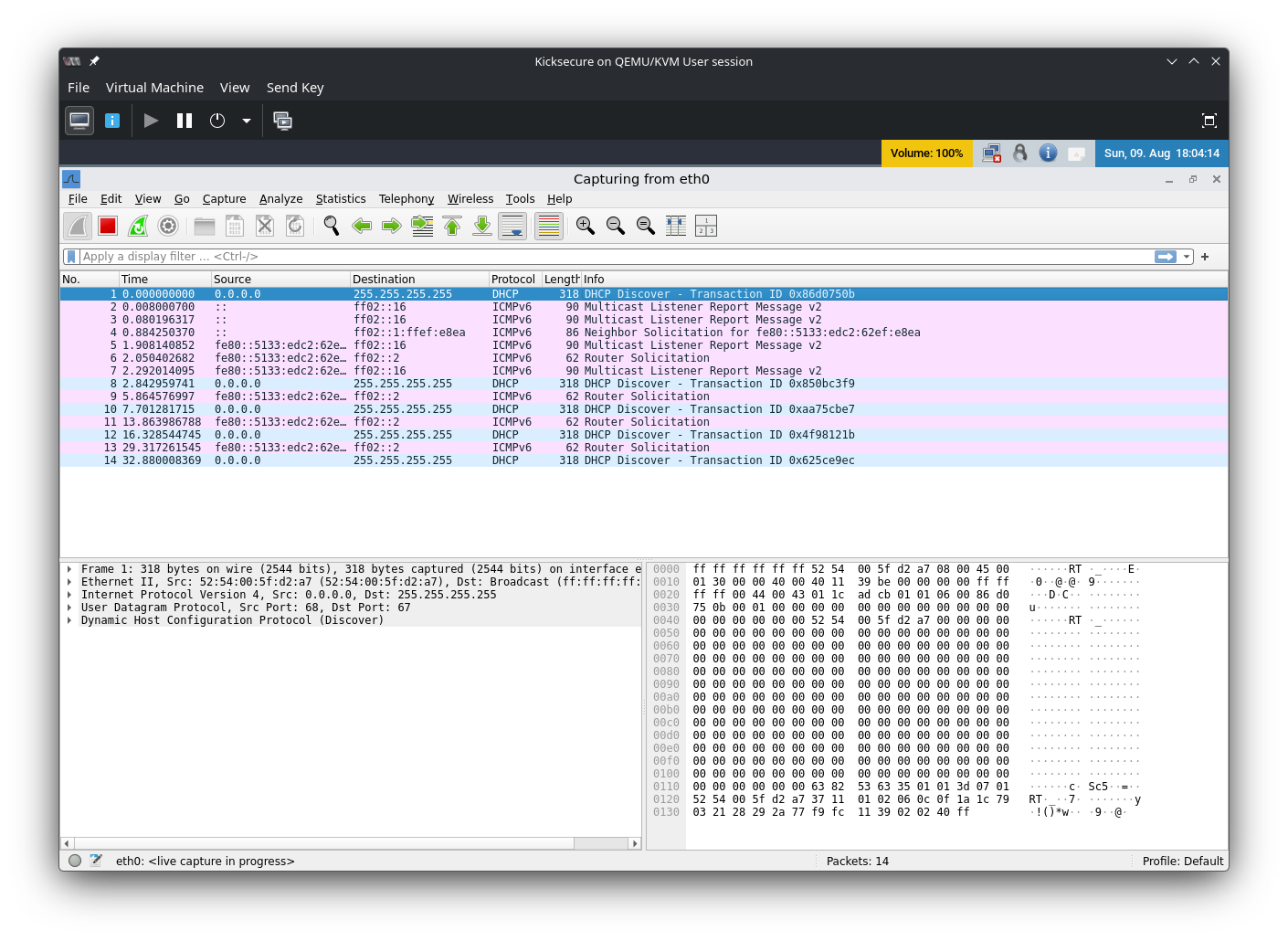
I can’t see anything AppArmor-related that would mess up passt’s ability to function. The host’s network is fully functional and there isn’t anything “weird” about the network setup that I’m aware of (the only thing that is likely to be changing firewalls is libvirt itself). I tried adding an <ip address...> setting to the libvirt XML, but didn’t see any change in symptoms from doing this. Ultimately I fell back to the default usermode networking (which I believe uses SLiRP?), and that works out of the box with no issues that I can tell (though I don’t think the VM gets an IPv6 address when I do that).
1 Like
solved it?
1 Like
Done by me, now /kvm represent rootless kvm configs.
I added the page as copy/paste to reserve the history in case we want to go back, is that enough?
1 Like
Yes, that works. Confused as to why though, the profile is explicitly designed to work when using an unprivileged libvirt…
2 Likes
I’ve been thinking about posting this for a while; I’m not entirely sure that moving to rootless virtual machines is a security improvement over the original mechanism. To my awareness, the rootless VMs run with the full privilege of the running user, whereas when run normally, the VM processes are sandboxed to potentially reduce the impact of a VM escape. I wonder if there’s some way to bring back some of the advantages of the original way of using KVM while also keeping the work that’s been done here.
2 Likes
How does this new way work for multiple whonix gateways and workstations, is it as simple as having a freshly added gateway and workstation and cloning them on virt-manager?
Also what if you wanted to run two gateways at the same time like before, how does that work?
What is missing? The apparmor profile for qemu session? Is there more?
Its not about this anymore, its about changing the game entirely, no root policy thats first thing. Second is securing the user side and VMs from other applications, well we have already missing things:
- passt apparmor which can be copied from ubuntu and modified.
- Apparmor per VM or one for all of the VMs.
- Securing VMs connections mentioned here.
By implementing these we have the best OS for KVM VMs, as vbox and xen (most likely proxmox as well) dont have these security features together.