new wiki chapter:
Full Disk Encryption, chapter TPM
1 Like
new wiki page:
1 Like
Hello. I’ve created some text for the SimpleX messenger page. If all is well, you can add a new wiki page to the site
Introduction
[https://simplex.chat/ Simplex] - The first messenger
without user IDs.

* Many reviews and security experts highlight Simplex as the most anonymous and secure. For example:
https://privacyspreadsheet.com/messaging-apps
https://securemessagingapps.com/
https://privacyguides.org/en/real-time-communication/
https://eylenburg.github.io/im_comparison.htm
https://divestos-archive.codeberg.page/page/messengers.html
https://heise.de/select/ct/2025/9/2505715264990543311

* Simplex has passed 2 independent security audits in 2022 and 2024 <ref>
https://simplex.chat/blog/20221108-simplex-chat-v4.2-security-audit-new-website
https://simplex.chat/blog/20241014-simplex-network-v6-1-security-review-better-calls-user-experience.html#simplex-cryptographic-design-review-by-trail-of-bits
</ref>

The developer of Simplex Chat is respected in the Monero community and has spoken at several Monero conferences:

https://www.youtube.com/watch?v=Fl-QS0-qENw
https://www.youtube.com/watch?v=mWBDmautqK0


Advantages include:
* For registration, an email address or phone number is not required. Accounts do not have an ID.
* E2E-encrypted messages (with markdown and editing), voice messages, audio and video calls, images, videos and files.
* E2E-encrypted decentralized groups (only users know they exist).
* Disappearing messages.
* No Tor over Tor.
* Portable encrypted app storage — move profile to another device.
* You can set a false PIN code to destroy the entire database.
* Decentralized. Anyone can create a server (support for onion servers)
* Incognito mode — unique to SimpleX Chat. Creating a random name for entering a chat or creating a group. The number of random incognito chats is unlimited.
* Out-of-band Key exchange.
* 2-layers of e2ee. Quantum protection.
* Message integrity - to guarantee integrity the messages are sequentially numbered and include the hash of the previous message. If any message is added, removed or changed the recipient will be alerted.
* Additional layer of server encryption for delivery to the recipient, to prevent the correlation between received and sent server traffic if TLS is compromised.
* Message mixing to reduce correlation. SimpleX servers act as low latency mix nodes — the incoming and outgoing messages have different order.
* Secure authenticated TLS transport. Only TLS 1.2/1.3 with strong algorithms is used for client-server connections. Server fingerprint and channel binding prevent MITM and replay attacks. Connection resumption is disabled to prevent session attacks.
* Unidirectional message queues. Each message queue passes messages in one direction, with the different send and receive addresses. It reduces the attack vectors, compared with traditional message brokers, and available meta-data.
* Multiple layers of Content padding. SimpleX uses Content padding for each encryption layer to frustrate message size attacks. It makes messages of different sizes look the same to the servers and network observers.

Disadvantages include:
* As of the time of writing, calls in desktop version work only through browser WebRTC.


* Whonix forum discussion: [Using https://forums.whonix.org/t/using-simplex-over-xmpp-omemo/20396 SimpleX over XMPP (OMEMO)]


{{mbox
| image   = [[File:Ambox_warning_pn.svg.png|40px]]
The database and all accounts and chats are stored locally. To maintain access to chats in live mode, you must export the database before shutting down!

Settings - Database - Export Chat Archive.

If you lose your device or remove the software from the device, you will not be able to recover the lost data, unless you made a back up. To protect the data you need to make regular backups, as using old backups may disrupt your communication with some of the contacts.
}}
Installation
The installation of Simplex is possible through AppImage, Flatpak, deb package and terminal (console) cli-version.
Current versions of the packages and installation guides can be found here:

[https://simplex.chat/downloads/#desktop-app Desktop app]
[https://simplex.chat/docs/cli.html SimpleX Terminal (console) app]
[https://github.com/simplex-chat/simplex-chat/releases GitHub releases]
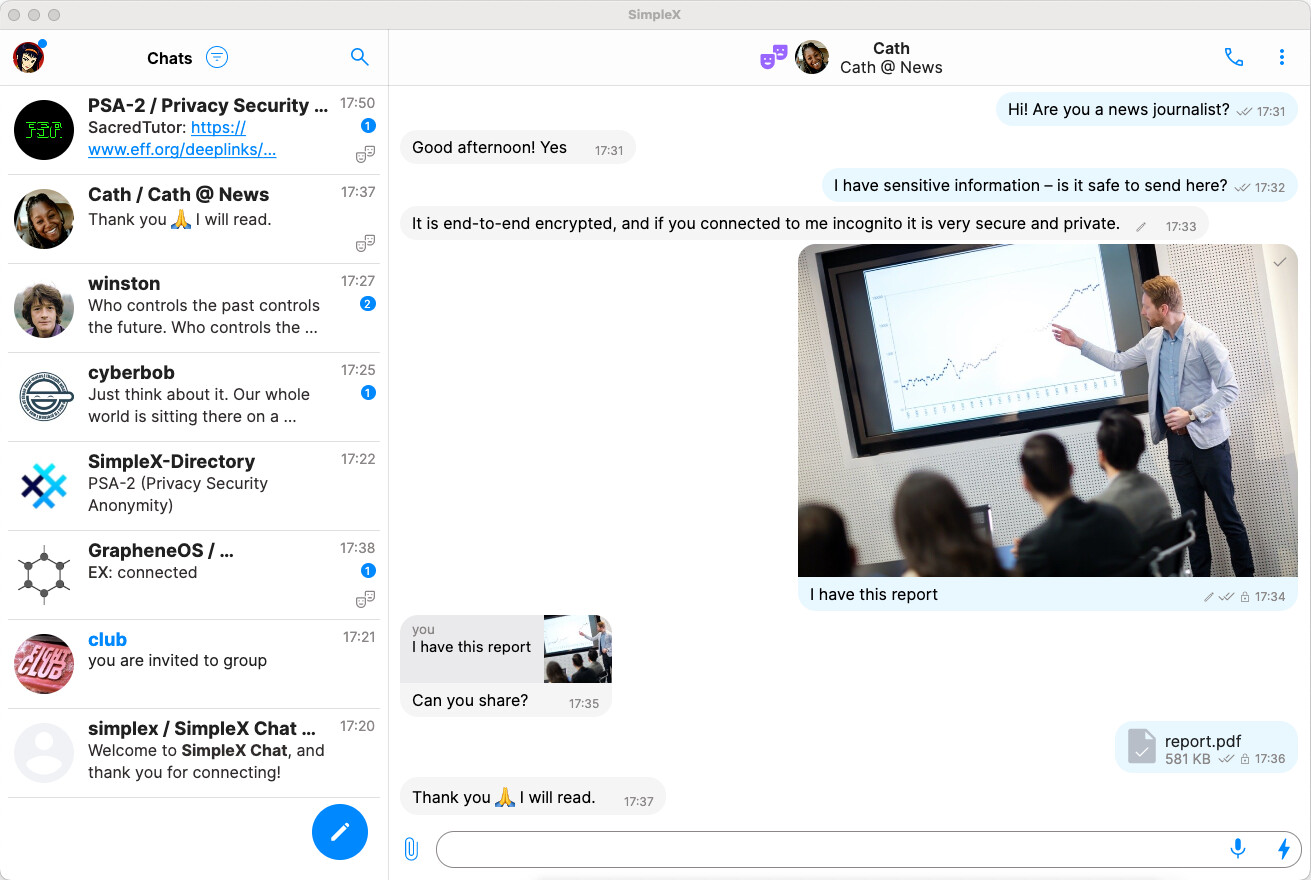
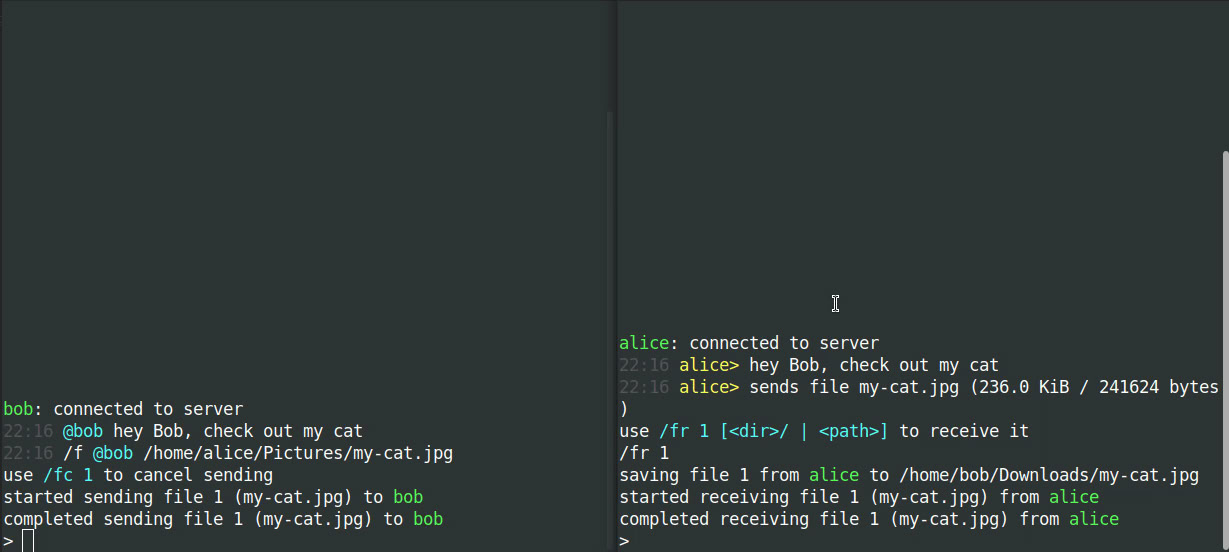
1 Like
Oh sorry. I didn’t notice this section about Simplex Instant Messenger Chat. Then you can add more information to that section from my text
1 Like
Please add any missing contents to the wiki.
1 Like
Done, check please. And also, I had problems loading images.
2 Likes
Which messenger on the Chat wiki page should stay on the Chat wiki page and which ones should get a dedicated wiki page?
Is a dedicated wiki page considered a promotion or demotion?
I am wondering if we can come up with some general criteria. Maybe every message should get its own wiki page and wiki/Chat would just be general information, compression and maybe short summaries of available applications.
Unidirectional message queues. Each message queue passes messages in one direction, with the different send and receive addresses. It reduces the attack vectors, compared with traditional message brokers, and available meta-data.simplex-chat/docs/GLOSSARY.md at stable · simplex-chat/simplex-chat · GitHub
cannot find the quote for this
1 Like
Yes sorry
Yes, that’s a great idea. Many Whonix users are new to linux. It would be more convenient for them to install and learn about recommended or reviewed messengers on a separate page. They might get confused on a wiki/Chat page, and accidentally click a command for a different messenger. The wiki/Chat page could contain a general overview and brief notes for unsupported messengers - for example, for Briar you could simply add: “Tor over Tor issue not resolved. Check this: Briar Desktop in Whonix”
For XMPP and Matrix clients, you can add separate “XMPP” and “Matrix” pages and publish reviews of all clients. XMPP and Matrix have too many clients to create a separate page for each one.
2 Likes
In addition, XMPP client and server compliance is all over the place:
It would be more efficient to narrow down XEPs that benefit Whonix users, then focus on which clients and/or servers that support as many of them as possible, or at least weighed towards the most impactful ones.
2 posts were split to a new topic: VPN Documentation
1 Like
initial announcement here in this wiki page:
major revision:
2 Likes
Edit https://www.whonix.org/w/index.php?title=Qubes%2FDisposables&diff=107041&oldid=106633 by @markthecoder
No longer using sudo qubesctl state.sls qvm.whonix-workstation-dvm may not be a great idea.
Removal of that command would require looking up what it does:
qubes-mgmt-salt-dom0-virtual-machines/qvm/whonix-workstation-dvm.sls at master · QubesOS/qubes-mgmt-salt-dom0-virtual-machines · GitHub
Which often isn’t simple with salt due to “dependencies” / “chain reaction” (one salt file referencing another).
Documenting this “why” in a footnote may be helpful.
Later down the page we kept command line commands in footnotes (<ref>...</ref>) even if GUI tools are available. Debatable how often that may be useful. (Maintenance effort versus duplication of Qubes documentation or not versus sharing helpful insights.)
Related: salt
1 Like
By looking at the Salt file you referenced, the GUI steps essentially duplicate what the Salt configuration does except for default dispvm and anon-vm tag.
1.The Whonix template VM and sys‑whonix are supposed to be present by default unless the user deliberately cancelled their installation during post install setup. Maybe mention the installation guide for users did not install whonix ( How-to: Install Qubes-Whonix ).
include:
  - qvm.template-whonix-workstation
  - qvm.sys-whonix
2.These settings are set by user manually during AppVM creation.
name:          whonix-workstation-{{ whonix.whonix_version }}-dvm
present:
  - template:  whonix-workstation-{{ whonix.whonix_version }}
  - label:     red
prefs:
  - netvm:     sys-whonix
3.Checking “Disposable template” in the GUI automatically sets this to true.
- template-for-dispvms: true
4.During GUI creation the dom0 default value is used; it must be changed manually by user later.
- default-dispvm: whonix-workstation-{{ whonix.whonix_version }}-dvm
5.The GUI creation process did nothing about qvm-tags. My notes also contain the command qvm-tags test-dvm add sdwdate-gui-client, which needs to be fixed.
tags:
  - add:
    - anon-vm
6.Again, checking “Disposable template” in the GUI turns this on automatically.
features:
  - enable:
    - appmenus-dispvm
7.Just like the first item, these requirements should already be satisfied by default.
require:
  - qvm:       template-whonix-workstation-{{ whonix.whonix_version }}
  - qvm:       sys-whonix
{%- endload %}
8.This isn’t needed; creating the AppVM via the GUI inherits the template app menus automatically, and switching to a disposable VM doesn’t require any extra refresh.
qvm-appmenus --update whonix-workstation-{{ whonix.whonix_version }}-dvm:
  cmd.run:
    - runas: {{ gui_user }}
    - onchanges:
      - qvm:  whonix-workstation-{{ whonix.whonix_version }}-dvm
In short, the GUI workflow gives users more flexibility when setting up a disposable VM—it lets you pick the name, the colour, and the gateway VM. However, you still have to configure the disposable VM manually and add the anon‑vm tag. I find the GUI approach more convenient, especially because I run several Whonix Workstation profiles, whereas the Salt method enforces a fixed configuration. Perhaps we should add a selection tab that lets users choose between the two approaches.
A sensible improvement would be to include the Salt recipe for creating a disposable Whonix workstation as part of the default Qubes installation, so users gets a disposable Whonix VM out‑of‑the‑box.
1 Like
WIth Qubes development going forward, Qubes will very likely (they did so in the past) edit the salt files but not the wiki. Hence the salt approach is clearly preferred as it receives code review by Qubes developers.
That would be good.
Hello, I’m wondering why this edit was reverted, given that the Debian apt source hasn’t received any updates since 2020. Wiki History
I’d also like to add two images to my recently updated Monero wallet isolation tutorial—one to show the setup layout and another to illustrate the policy editor. Should I just upload them in this thread?
monero (0.18.4.5+~0+20200826-1) unstable; urgency=medium
[…]
– Bastian Germann bage@debian.org Mon, 23 Feb 2026 11:40:55 +0100
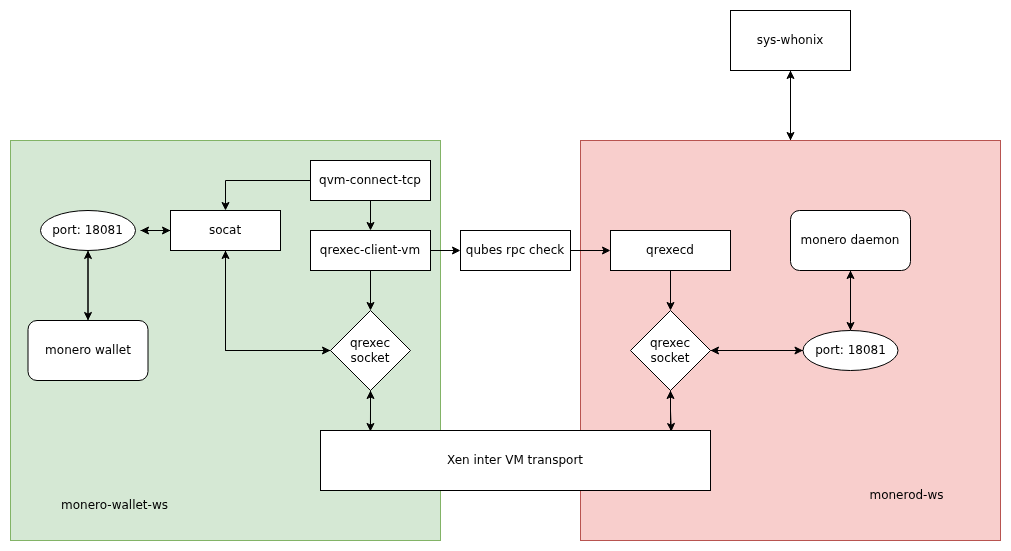
I’d like to place this architecture diagram in the beginning of setup section. How-to: Use Monero with Wallet Isolation in Qubes-Whonix

1 Like
I’d like to place this architecture diagram in the beginning of setup section. How-to: Use Monero with Wallet Isolation in Qubes-Whonix
Hello, after some research, I have made a better one, please use this instead:
1 Like
@Patrick , I’m planning to write a new tutorial on split Trezor setup. It follows a similar structure as the Monero wallet isolation guide. By setting up the Trezor bridge service on the USB VM and using qvm‑connect‑tcp, any Qubes VM—including a browser‑based wallet—can access the Trezor device without a direct USB connection. Can you create the wiki page for me?
1 Like